The Creditors Ledger report module is used to generate the Accounts Payable Subsidiary Ledger. This report presents a detailed list of all transactions (such as purchase invoices, payments, and credit/debit notes) for each supplier (vendor) or all suppliers within a specific time period. It is a fundamental report for managing and reconciling payable accounts.
1. Report Parameters (Filter)
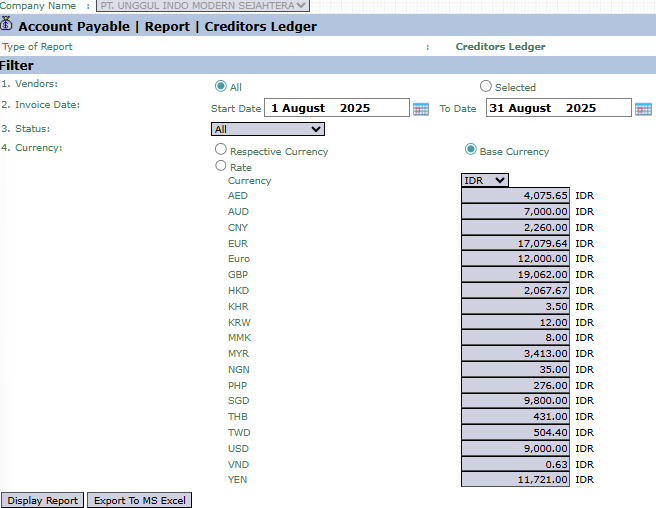
The main page of this module is a form containing various parameters to customize the Creditors Ledger report that will be generated.
Here is an explanation for each parameter:
Vendors:
Select All to display the creditors ledger for all suppliers.
Select Selected to display the creditors ledger for one specific supplier.
Invoice Date:
Specify the Start Date and To Date range to define the report's period (e.g., August 1, 2025, to August 31, 2025).
Status:
Use this dropdown to filter transactions by their status.
Currency:
Choose how currency values will be displayed, whether in Respective Currency (original transaction currency) or Base Currency (company's base currency).
2. Steps to Generate the Report
Step 1: Set Report Parameters
Select all the parameters you need, especially defining the Invoice Date range and the scope of Vendors you wish to see.
Step 2: Generate the Report
After all parameters are set, click one of the two buttons in the bottom-left section of the page:
Display Report: To preview the creditors ledger report directly on your screen.
Export To MS Excel: To download the report data in an Excel file format.
3. Example of the Report View
After you click, the system will generate a report like the following, which functions as a statement of account for a vendor.
Report Explanation: This report details all payable activity for the selected vendor and is divided into two main parts: a list of invoices and a list of debit/credit notes.
Key Columns:
Invoice Number: A list of purchase invoices from the vendor.
Invoice Amount: The total value of each invoice.
Total Paid: The amount that has already been paid for that invoice.
Invoice Amount Due: The remaining unpaid balance per invoice.
Debit Credit Notes Number: A list of debit or credit notes related to the vendor.
Tips & Important Notes
The Creditors Ledger report is one of the most important reports in the Accounts Payable module.
Use this report to reconcile your payable balance with the statement of account sent by the vendor.
Use the Selected Vendor filter to focus on one vendor when preparing payments or if there is a billing dispute.




No comments to display
No comments to display