The Debit & Credit Note Report (Debit Credit Analysis) module is used to generate a detailed list of all Debit Notes and Credit Notes that have been issued to customers. This report is used to track and analyze all adjustment transactions (additions or reductions) that have occurred on customer receivables within a specific period.
1. Report Parameters (Filter)
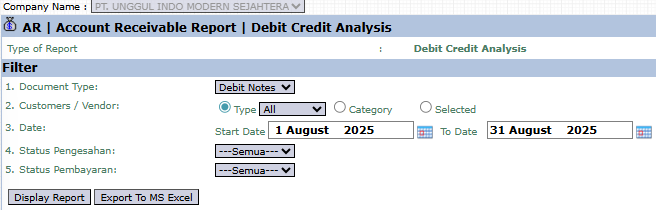
The main page of this module is a form containing various parameters to customize the report that will be generated.
Here is an explanation for each parameter:
Document Type:
The primary filter to select the type of document you want to see. You can select Debit Notes (to increase receivables) or Credit Notes (to decrease receivables) from the dropdown.
Customers / Vendor:
Filter the report by customer by selecting Type All, Category, or Selected (Specific Customer).
Date:
Specify the Start Date and To Date range to define the report's period (e.g., August 1, 2025, to August 31, 2025).
Approval Status:
Use this dropdown to filter documents based on their approval status (e.g., those still awaiting approval or those already approved).
Payment Status:
Use this dropdown to filter documents based on their payment status.
2. Steps to Generate the Report
Step 1: Set Report Parameters
Select all the parameters you need, especially defining the Document Type and the Date range you wish to analyze.
Step 2: Generate the Report
After all parameters are set, click one of the two buttons in the bottom-left section of the page:
Display Report: To preview the report directly on your screen.
Export To MS Excel: To download the report data in an Excel file format.
Tips & Important Notes
Use this report to summarize all customer receivable adjustments (additions or reductions) within a single period.
The Approval Status filter is very useful for tracking which Debit or Credit Notes are still awaiting approval from a manager.
This is an important report for the Accounts Receivable (AR) team to ensure all receivable adjustments are recorded and have gone through the correct approval workflow.





No comments to display
No comments to display