The Purchase Return Report module is used to generate a detailed list of all return transactions or goods returns made to suppliers (vendors) within a specific period. This report is used to monitor, summarize, and analyze purchase return activities.
1. Report Parameters (Filter)
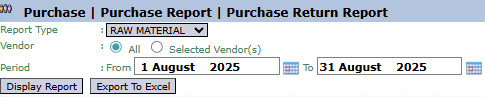
The main page of this module is a form containing various parameters to customize the report that will be generated.
Here is an explanation for each parameter:
Report Type:
Use this dropdown to filter the report by the type or category of the returned product (e.g., RAW MATERIAL).
Vendor:
Select the vendor scope for the report: All or Selected Vendor(s).
Period:
Specify the From and To date range to define the period of returns to be displayed (e.g., August 1, 2025, to August 31, 2025).
2. Steps to Generate the Report
Step 1: Set Report Parameters
Select all the parameters you need, especially defining the Period range.
Step 2: Generate the Report
After all parameters are set, click one of the two buttons in the bottom-left section of the page:
Display Report: To preview the return report directly on your screen.
Export To Excel: To download the report data in an Excel file format.
3. Example of the Report View
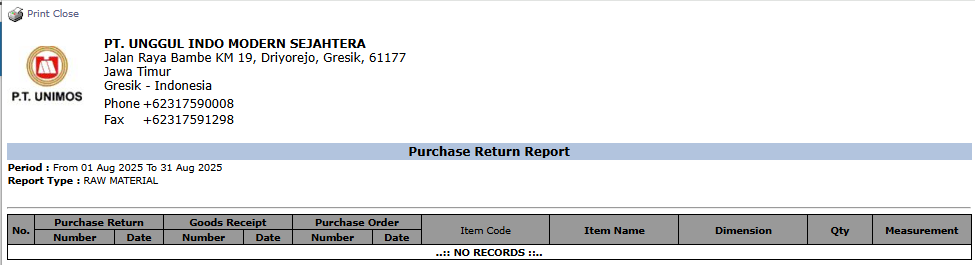
After you click, the system will generate a detailed report like the following, which details every return transaction and links it to the initial documents.
Report Explanation: This report will display a list of all purchase return documents.
Key Columns:
Purchase Return: Displays the Number and Date of the return document.
Goods Receipt: Displays the Number and Date of the original goods receipt document.
Purchase Order: Displays the Number and Date of the original Purchase Order.
Item Code, Item Name, Qty: Details of the product and the quantity that was returned.
Tips & Important Notes
Use this report to analyze return trends from a specific vendor or for a specific product.
This report is a recapitulation of the data input in the Purchase Return module. Ensure all return data has been recorded correctly.
This report is very useful for the Procurement and Warehouse teams to track the complete document flow and goods return process.




No comments to display
No comments to display