
Mail Zimbra Architecture
Flow Architecture
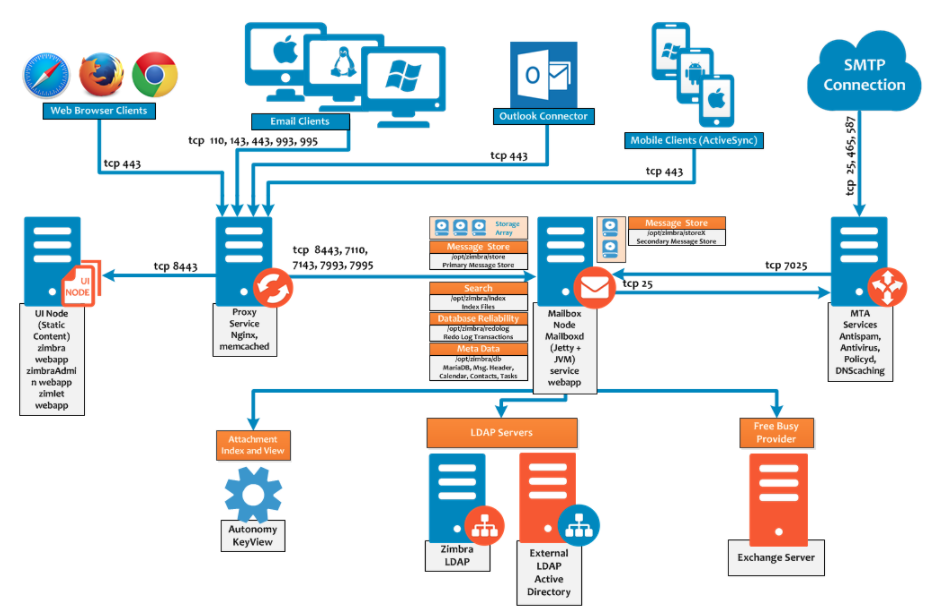
Servers Support
Here are the servers needed for EMAIL to work
1. Web Mail
- Provides browser-based email access for users who don’t use dedicated email clients.
2. IMAP/POP Server
- Handles incoming email and allows users to retrieve messages. IMAP supports multi-device sync; POP3 is simpler and downloads emails locally.
3. MTA (Mail Transfer Agent) server
- Software like Postfix, Exim, or Sendmail that routes outbound and inbound emails between servers.
4. MDA (Mail Transfer Agent) server
- Delivers email into users’ mailboxes, often paired with MTA systems.
5. SMTP Relay server
- An SMTP relay server securely forwards outgoing email messages from a sender's server to the recipient's email server across the internet.
6. Antivirus Server
- An antivirus server scans, detects, and removes malware from network-connected devices and email traffic to protect enterprise systems from cyber threats.
7. Authentication Server (LDAP / Active Directory)
- Manages user identity and permissions, often connected to internal directory services.
8. Email Archive/Retention Server
- Stores emails securely for legal, compliance, and business continuity reasons.
9. Spam Filtering / Anti-Spam Gateway
- Detects and blocks spam messages using blacklists, heuristics, or AI-based algorithms.
10. Encryption or Public Key Infrastructure (PKI) Server
- Manages digital certificates and email encryption for secure end-to-end communication.
11. Monitoring & Logging Server
- Tracks system health, email traffic, errors, and suspicious behavior for audits and diagnostics.
12. Backup & Disaster Recovery Server
- Performs regular backups and ensures recoverability of email data in case of failure or attack.