The Sales Forecast Focus Item module is a tool to set up and manage which products are considered "focus items" in the sales forecasting process. This setup allows the company to give special attention to the planning of key products, including linking them to raw material requirements.
1. Main View (Category List)
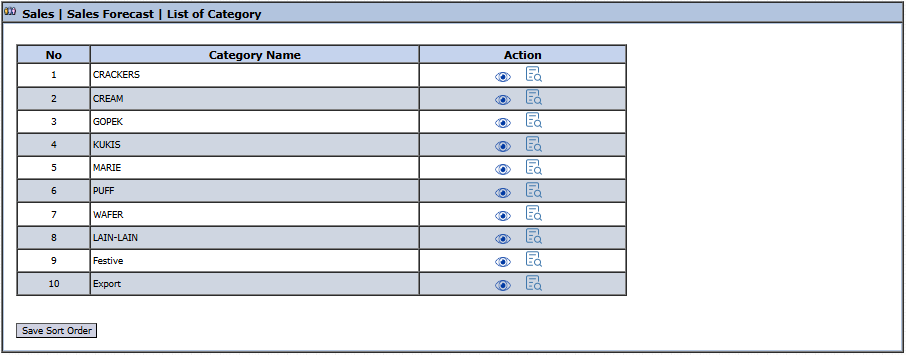
The main page of this module displays a list of product categories to facilitate the management of focus items.
View Explanation
Category List: This page displays all main product categories such as CRACKERS, CREAM, KUKIS, and others.
Action Column: To the right of each category name, there are action icons:
Eye Icon (View): Click to see the list of items within that category.
List Icon (Detail): Likely has the same function as the view icon or is for a report.
2. Category Detail Page
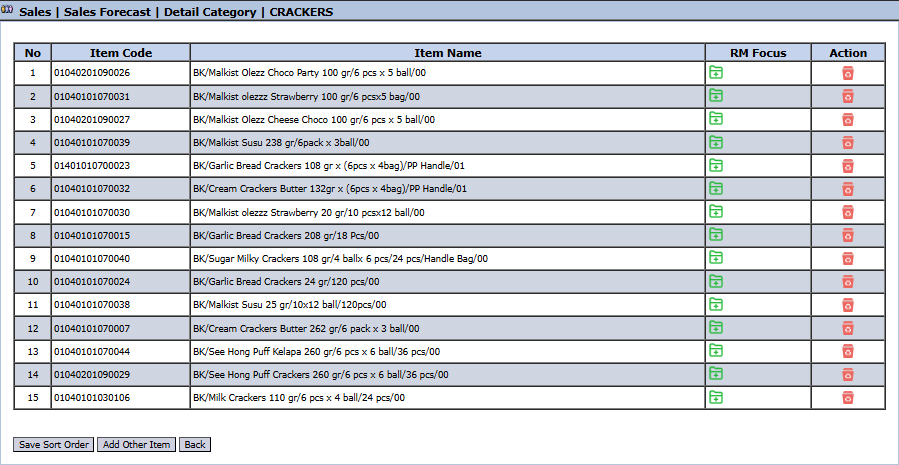
After you click on one of the categories from the main page (e.g., CRACKERS), you will be directed to a detail page that displays all the product items included in that category.
View Explanation
This page is where you manage the items within a category.
Item List: This table displays all products in the selected category, along with their Item Code and Item Name.
RM Focus Column: This column, along with the Add item formula button, most likely functions to mark a product as a "focus item" and link it to its formula or primary Raw Material.
Action Column: Contains an icon to delete an item from the list.
Button Functions
Save Sort Order: To save the display order of items after it has been changed.
Add Other Item: To add another product to this category list.
Back: To return to the Category List page.
Tips & Important Notes
This module is used to highlight key products that require special attention in the planning process.
By marking an item as a 'focus' and linking it to raw materials via the RM Focus feature, the PPIC (Production Planning and Inventory Control) team can be more proactive in planning material requirements based on the forecast for that finished good.
This is an important master data setup and is typically managed by the Sales Admin or PPIC team.



No comments to display
No comments to display