
Customer Group
Module Guide: Customer Group
Module Location
Sales > Customer > Customer Group
Module Objective
The Customer Group module is used to create and manage simpler or more specific customer groupings. Unlike Customer Category, which has a hierarchical structure and complex accounting links, Customer Group is typically used for more flexible reporting or promotional setup purposes.
1. Main View (Customer Group List)
The main page of this module displays a list of all Customer Groups that have been created.
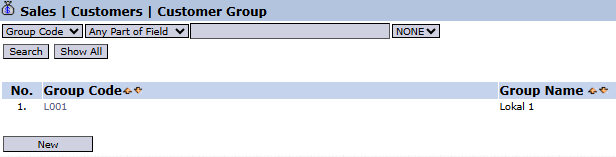
View Explanation
This page is for viewing and managing all existing groups.
-
Filter: You can search for a specific group using the search bar based on the Group Code.
-
Group List: The table below displays a summary of each group, with columns for Group Code and Group Name. There is one example of a group named "Lokal 1".
Button Functions
-
New: The primary button to create a new Customer Group.
2. Steps to Create a New Customer Group
Step 1: Create a New Group
From the Main View, click the New button to open the Add Customer Group form. 
Step 2: Fill in Group Details
On the form that appears, fill in the required details:
-
Group Code: Enter a unique code for your customer group.

-
Group Name: Enter a descriptive name for the group.

Step 3: Save the New Group
Click the Save button to save the new group. The group will now appear in the Main View. 
Tips & Important Notes
-
Use Customer Groups for more dynamic segmentation. For example, you can create a "VIP Customers" group or an "Exhibition Area Customers" group for specific promotional programs.
-
This grouping can be used as a filter in various sales reports to analyze the performance of specific customer segments.
No comments to display
No comments to display