The Integrity Report module is a crucial diagnostic and verification tool. Its purpose is to check the integrity and consistency of the financial data within the system. This report is typically used to ensure that the total balance in a sub-ledger (e.g., the accounts receivable or accounts payable ledger) matches the balance of its control account in the General Ledger.
1. Report Parameters
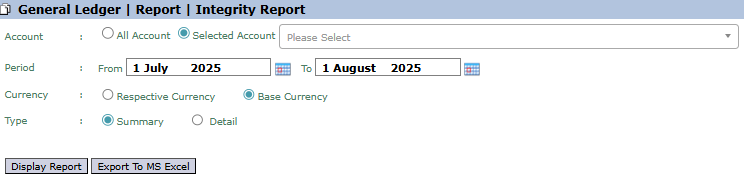
The main page of this module is a form containing several parameters to define the scope of the verification report.
Here is an explanation for each parameter:
Account:
Select All Account to check the integrity of all accounts.
Select Selected Account to run a check on one specific account (e.g., the Accounts Receivable control account).
Period:
Specify the From and To date range to define the checking period (e.g., July 1, 2025, to August 1, 2025).
Currency:
Choose how currency values will be displayed, either in Respective Currency (original currency) or Base Currency (base currency).
Type:
Choose the report's level of detail.
Summary: Displays the report in a summary format, typically only showing totals and the difference (if any).
Detail: Displays the transaction details that make up the balance to assist in the tracing process.
2. Steps to Generate the Report
Step 1: Set Report Parameters
Select all the parameters you need, especially defining the Account (if specific) and the Period you wish to check.
Step 2: Generate the Report
After all parameters are set, click one of the two buttons in the bottom-left section of the page:
Display Report: To see the integrity report results directly on your screen.
Export To MS Excel: To download the report data in an Excel file format.
Tips & Important Notes
Run this report routinely, especially during the monthly closing process, to ensure there are no data imbalances between the sub-ledgers and the general ledger.
If this report shows a difference or imbalance, it is an indication of a data issue that needs to be immediately investigated and corrected by the Accounting or MIS team.
Use the Detail type to help trace the specific transactions that might be causing the imbalance.




No comments to display
No comments to display