The Cost Center module serves as the master data hub for creating and managing the company's cost center structure. A Cost Center is a department, location, or even an asset (like a machine) where costs can be allocated for the purpose of tracking, budgeting, and analysis. The structure built here becomes the foundation for all departmental cost reporting.
1. Main View (Cost Center Structure)
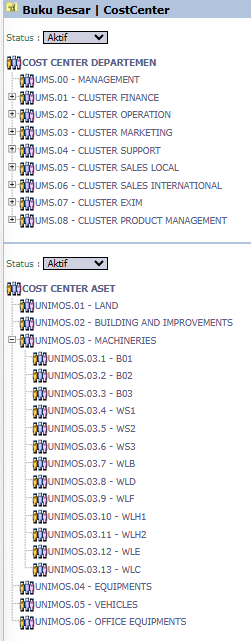
The main page of this module displays all the Cost Centers that have been created in a hierarchical tree view format.
View Explanation
Hierarchical Structure: This view shows the parent-child relationship between Cost Centers. You can see two main groups: DEPARTMENTAL COST CENTERS (for functional units like Finance, Marketing, Sales) and ASSET COST CENTERS (for physical assets like a Building or Machine).
Navigation:
You can click the [+] or [-] icons to expand or collapse the structure's branches.
To edit a Cost Center, double-click on its name to enter the Edit form.
2. Steps to Manage a Cost Center
Step 1: Create a New Cost Center
To create a new Cost Center (for example, a new department under CLUSTER SUPPORT), you must first enter the edit mode of its parent.
Double-click on CLUSTER SUPPORT to open the Edit form.
On the Edit form, click the Add Child button. This will open the form to create a new Cost Center.
Step 2: Fill in Cost Center Details (Add Form)
On the form that appears, fill in the required details:
Cost Center Code: Enter a unique code for the cost center (mandatory *).
Cost Center Name: Enter a descriptive name for the cost center (mandatory *).
Type: Select the appropriate type from the dropdown.
Click Save to create the new Cost Center.
Step 3: Modify or Deactivate a Cost Center
You can change existing Cost Center data via the Edit form.
Change the Cost Center Name or Type if needed.
Use the Delete button to remove it (if no transactions have ever been linked to it) or the Disable button to deactivate the Cost Center so it can no longer be used in new transactions.
Tips & Important Notes
The Cost Center structure you build here will become the options available when allocating costs in all transaction modules (e.g., General Journal, Purchase Invoice, etc.).
This is a crucial master data setup and should be well-designed according to the company's organizational structure. Coordinate with the Accounting and Cost Planning Control teams.
Grouping ASSET COST CENTERS down to the individual machine level (like B01, WS1) allows for very detailed tracking of maintenance or operational costs per machine.








No comments to display
No comments to display