
Free of Charge Report
Report Module Guide: Free of Charge Report
Module Location
Sales > Free of Charge > Free of Charge Report
Module Objective
The Free of Charge Report module is used to generate a report that details all transactions of goods shipped to customers at no charge (for free). This report is very useful for tracking the issuance of goods for promotional purposes, samples, or other marketing activities.
1. Report Parameters (Filter)
The main page of this module is a form containing several parameters to customize the report that will be generated.
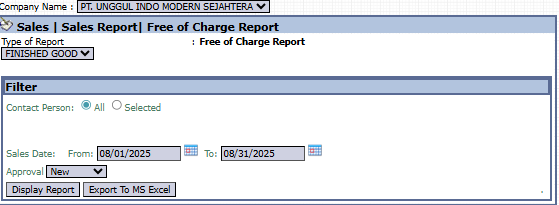
Here is an explanation for each parameter:
-
Contact Person:
-
Filter the report by a specific contact person (Selected) or display data from all contact persons (All).
-
-
Sales Date:
-
Specify the From and To date range to define the report's period (e.g., 08/01/2025 to 08/31/2025).
-
-
Approval:
-
Use this dropdown to filter by the approval status of the free-of-charge transaction (e.g., New).
-
2. Steps to Generate the Report
Step 1: Set Report Parameters
Select all the parameters you need, especially defining the Sales Date range to get specific data. 
Step 2: Generate the Report
After all parameters are set, click one of the two buttons in the bottom-left section of the page:
-
Display Report: To preview the report directly on your screen.

-
Export To MS Excel: To download the report data in an Excel file format.

3. Example of the Report View
After you click, the system will generate a detailed report like the following, which details every shipment of free goods.
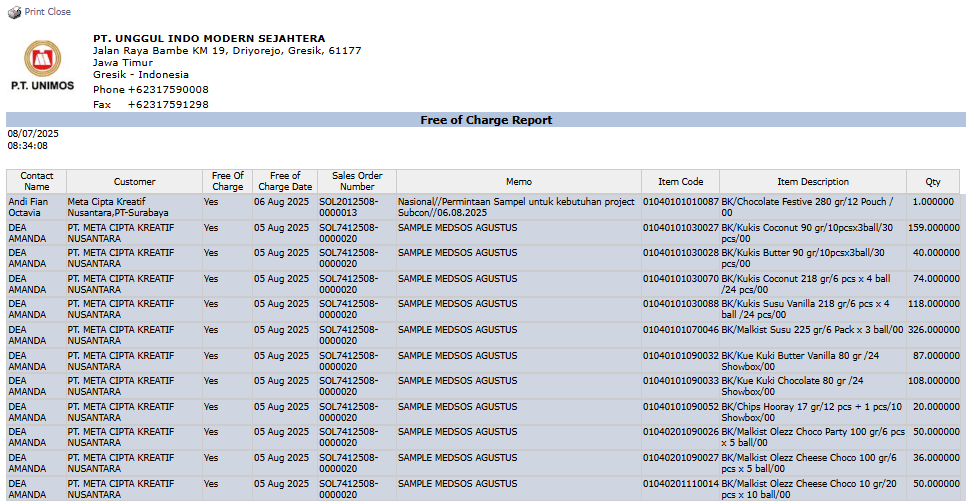
Report Explanation: This report displays a detailed list of each free-of-charge transaction, complete with information on:
-
Contact Name and Customer: The recipient of the goods.
-
Sales Order Number: The reference sales order number.
-
Memo: A description of the purpose of the shipment (e.g., SOCIAL MEDIA SAMPLE AUGUST).
-
Item Code, Item Description, and Qty: Details of the items and the quantities given.
Tips & Important Notes
-
This report is very important for the Marketing and Sales teams to track the distribution of sample goods or promotional items.
-
The Accounting team can use this report for the purpose of recording promotional expenses or for inventory control of goods that are issued without generating revenue.
-
To ensure this report is accurate, make sure that free-of-charge transactions (for example, a Sales Order with a zero price) are recorded correctly in the system.
No comments to display
No comments to display