The Campaign List module functions as the central hub for planning, budgeting, executing, and monitoring all marketing campaigns or promotional events. This module allows you to define event details, assign responsible persons, and track its budget and actual realized costs.
1. Main View (Campaign List)
The main page of this module displays a list of all promotional events or campaigns that have been created.
View Explanation
This page provides a general overview of all ongoing or completed campaigns.
Filters: You can search for a specific campaign by Campaign Code or a Date From and Date To range.
Campaign List: The table below displays a summary of each campaign. There is one example of a "Festival Food" campaign in Gresik.
Column Explanation
Campaign Code: The unique code for each promotional event.
Campaign Name: The name of the promotional event.
Location: The location where the event is held.
Start Date / End Date: The start and end dates of the event.
Total Budget: The total budget allocated for the event.
Total Expenses: The total actual costs that have been incurred for the event.
Button Functions
New: The primary button to create new promotional event data.
Print: To print the details of a selected event.
Delete: To delete a selected event.
2. Steps to Create a New Promotional Event
Step 1: Create a New Campaign
From the Main View, click the New button to open the Add Campaign form.
Step 2: Fill in Campaign Details
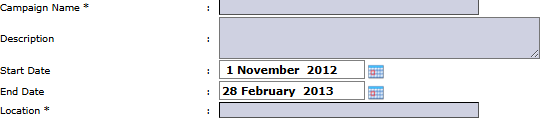
Fill in all the relevant information on the form that appears. Fields marked with (*) are mandatory.
Campaign Name, Description, Start Date, End Date, Location: Fill in all the basic details about the promotional event.
Campaign Manager & Campaign Staff: Assign the manager and staff responsible for the event's execution by clicking [+] Add Person.
Budget: Link the campaign with its allocated budget. Click [+] Add Row to add the Budget Code and Budget Amount details.
Step 3: Save the Campaign
After all details are filled in, click the Save button to save the new promotional event data.
Tips & Important Notes
Use this module for all promotional activities so that their expenses and effectiveness can be tracked centrally.
Monitor the Total Budget vs. Total Expenses columns on the main page to ensure event spending does not exceed the budget.
For the Total Expenses column to be populated automatically, ensure that all costs related to this promotion are correctly allocated to the corresponding Campaign Code in other modules (e.g., when recording a purchase invoice for the venue rental fee).








No comments to display
No comments to display