
Debtor Ledger
Report Module Guide: Debtors Ledger
Module Location
Accounts Receivable > Report > Debtor Ledger
Module Objective
The Debtor Ledger report module is used to generate the Accounts Receivable Subsidiary Ledger. This report presents a detailed list of all transactions (such as invoices, payments, and credit/debit notes) for each customer or all customers within a specific time period. It is a fundamental report for managing and reconciling customer receivable accounts.
1. Report Parameters (Filter)
The main page of this module is a form containing various parameters to customize the Debtors Ledger report that will be generated.
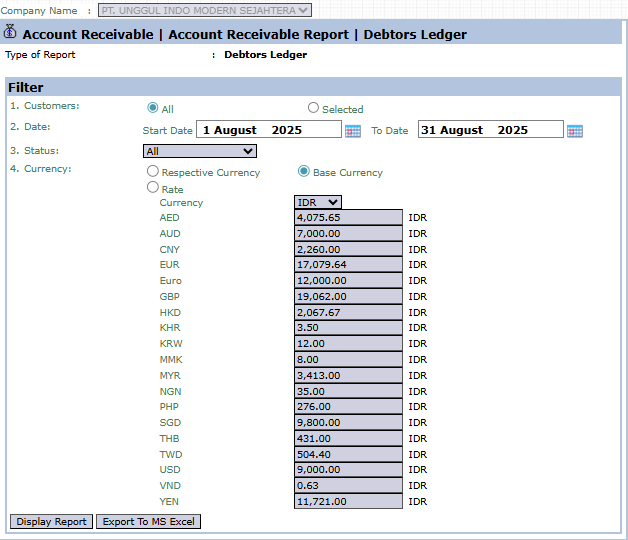
Here is an explanation for each parameter:
-
Customers:
-
Select All to display the debtors ledger for all customers.
-
Select Selected to display the debtors ledger for one specific customer.
-
-
Date:
-
Specify the Start Date and To Date range to define the report's period (e.g., August 1, 2025, to August 31, 2025).
-
-
Status:
-
Use this dropdown to filter transactions by their status.
-
-
Currency:
-
Choose how currency values will be displayed, either in Respective Currency (original transaction currency) or Base Currency (company's base currency).
-
2. Steps to Generate the Report
Step 1: Set Report Parameters
Select all the parameters you need, especially defining the Date range and the scope of Customers you wish to see.

Step 2: Generate the Report
After all parameters are set, click one of the two buttons in the bottom-left section of the page:
-
Display Report: To preview the debtors ledger report directly on your screen.

-
Export To MS Excel: To download the report data in an Excel file format.

Tips & Important Notes
-
The Debtors Ledger report is one of the most important reports in the Accounts Receivable module. Use it to see the complete transaction history per customer.
-
This report is the basis for reconciling the receivable balance with the customer's records.
-
Use the Selected Customer filter to focus on one customer when handling inquiries or billing disputes.
No comments to display
No comments to display