
Item Category Sales Forecast
Module Guide: Sales Forecast Item Category
Module Location
Sales > Sales Forecasting > Sales Forecast Item Category
Module Objective
The Sales Forecast Item Category module serves as a tool to manage the master data used for grouping products into various categories and sub-categories. This categorization aims to simplify the process of creating and analyzing sales forecast reports.
1. Main View (Category Structure)
The main page of this module displays all the product categories and sub-categories that have been created in a hierarchical structure format.
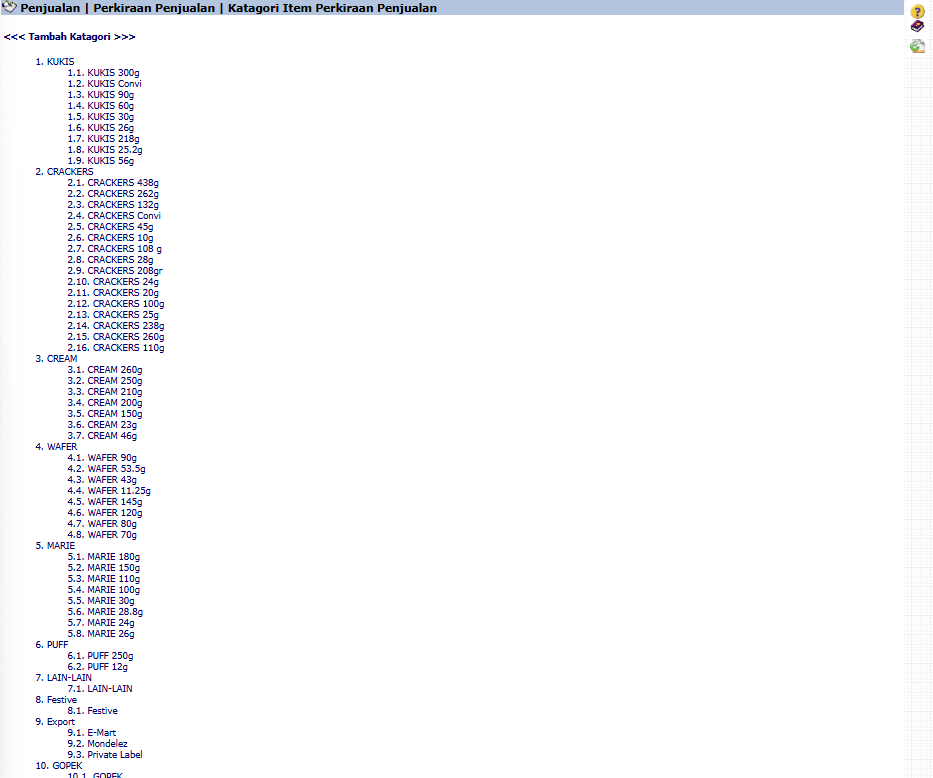
View Explanation
-
Tree View: This display shows the parent-child relationship between categories, such as 1. KUKIS as the main category and 1.1. KUKIS 300g as its sub-category.
-
Navigation:
-
To add a new main category, click the <<< Add Category link at the top.
-
To view or edit the contents of a category (for example, to see which products are in "KUKIS 300g"), click on the category name.
-
2. Category Detail Page
After you click on one of the category names from the main page, you will be directed to a detail page that displays all the product items included in that category.
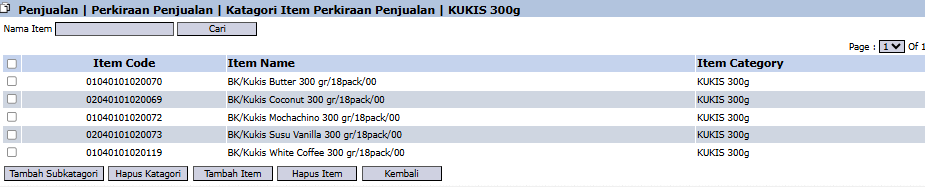
View Explanation
This page, for example for "KUKIS 300g", displays all product items such as "BK/Kukis Butter 300 gr", "BK/Kukis Coconut 300 gr", and others that are included in that category.
Button Functions
The buttons at the bottom of this page are the primary tools for managing the category's contents:
-
Add Subcategory: To create a new sub-category under the category you are currently viewing.

-
Delete Category: To permanently delete this category.

-
Add Item: To add a new product to this category. This action will usually open a product search window.

-
Remove Item: To remove a selected product (by checking the box on the left) from this category.

-
Back: To return to the Main View (Category Structure).

Tips & Important Notes
-
The category structure you create here will become the basis for grouping items in the Sales Forecast Report.
-
Ensure all products have been placed into their appropriate categories so that the forecast data becomes organized and easy to analyze.
-
This is an important master data setup module and is typically managed by the Sales Admin team or the master data team.
No comments to display
No comments to display