The Profit & Loss module is used to generate the Profit & Loss Statement, which presents a company's financial performance by summarizing all Revenues and Expenses over a specific period of time. The module provides various parameter options to customize the report for your analysis needs, including flexible currency options.
1. Profit & Loss Report Parameters (Profit & Loss Filter)
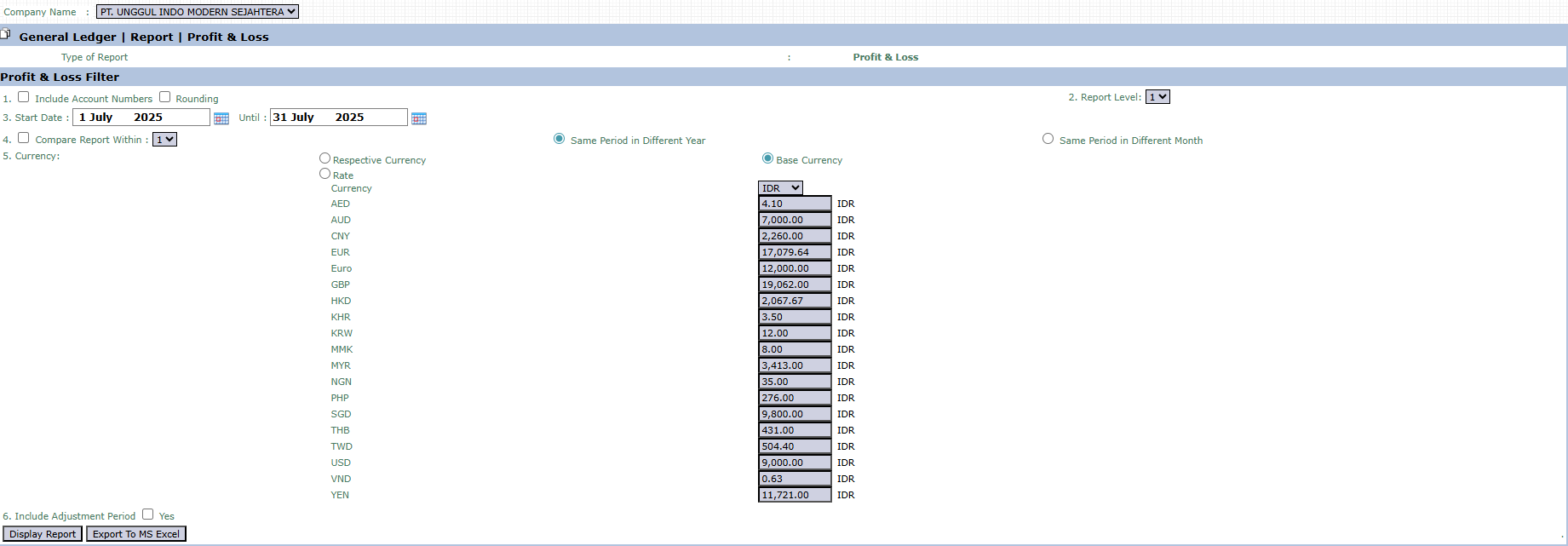
The main page of this module is a form containing various parameters to customize the report that will be generated.
Here is an explanation for each parameter:
Include Account Numbers / Rounding:
Check Include Account Numbers to display account codes on the report.
Check Rounding to round the monetary values on the report.
Report Level:
This dropdown is used to set the report's level of detail (e.g., summary or detailed).
Start Date / Until:
The most important parameters that define the report's time period. Enter the start and end dates of the period to be analyzed (e.g., July 1, 2025, to July 31, 2025).
Compare Report Within:
Activate this feature to create a comparative report with the same period in a different year or a different month.
Currency:
Choose how currency values will be displayed.
Respective Currency: Will display values in the original currency of each transaction.
Base Currency: Will convert all transactions to the company's base currency (e.g., IDR) based on existing exchange rates.
Include Adjustment Period:
Check Yes if you want to include adjusting entries in the profit and loss calculation.
2. Steps to Generate the Report
The process to create a Profit & Loss report is very easy:
Step 1: Set Report Parameters
Fill in or select all the parameters you need in the Profit & Loss Filter section to ensure the generated report matches the scope of your analysis.
Step 2: Generate the Report
After all parameters are set, click one of the two buttons in the bottom-left section of the page:
Display Report: To preview the report directly on your screen.
Export To MS Excel: To download the report data in an Excel file format.
Tips & Important Notes
The Profit & Loss Statement is a report of financial performance for a period of time. Ensure the Start Date and Until date range is correct.
Use the Currency option to analyze performance in a specific foreign currency. This is very useful for reports related to International Business activities.
Take advantage of the Export To MS Excel feature for further analysis, such as calculating profitability ratios or creating performance graphs for presentations.



No comments to display
No comments to display