The Credit Note module within Accounts Payable is used to record Credit Note documents received from suppliers (vendors). In the context of payables, a Credit Note from a supplier serves to increase the company's liability or debt. It is typically used to record additional charges that were not included in the original purchase invoice or to correct an invoice that was under-billed.
1. Main View (Credit Note List)
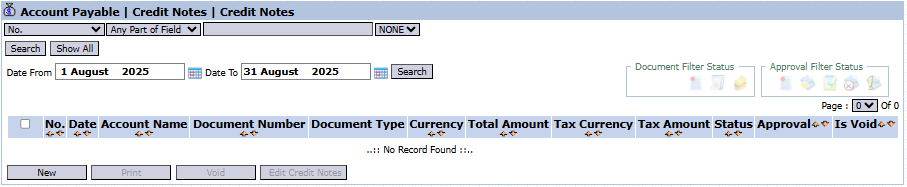
The main page of this module displays a list of all Credit Notes that have been received from vendors and recorded in the system.
View Explanation & Filters
This page is for viewing and managing all existing Credit Notes.
Filters: You can search for a specific Credit Note by its document number (No.) or a date range (Date From / Date To).
Credit Note List: The table below will display all documents that match the filters, with columns such as Document Number, Account Name (Vendor Name), Total Amount, Status, and Approval.
Button Functions
New: The primary button to record a new Credit Note from a vendor.
Print: To print the details of a selected Credit Note.
Void: To cancel a Credit Note that has already been recorded.
2. Steps to Create a Credit Note
Step 1: Create a New Credit Note
From the Main View, click the New button to open the New Credit Notes form.
Step 2: Fill in Header Information
On the form that appears, fill in the general information:
Vendor: Select the name of the supplier (vendor) who sent the Credit Note (e.g., ABADI JAYA MAKMUR).
Date: Enter the document date (e.g., August 11, 2025).
Memo: Provide a clear explanation for the reason for the Credit Note (e.g., "Additional shipping costs for invoice No. XXX").
Related document / File Upload: You can link another document or upload a supporting evidence file.
Step 3: Save and Confirm
After all data and the journal entry have been filled in correctly, use the buttons in the bottom-left section:
Save: To save the Credit Note as a draft.
Confirm: To finalize the document and send it into the approval workflow.
Cancel: To cancel the entry.
Tips & Important Notes
A Credit Note in the Accounts Payable module is used to increase the amount of debt you owe to a vendor. This is the opposite of a Debit Note (for purchase returns) in the same module.
Ensure the journal entry in the detail table is correct before it is confirmed.
A confirmed Credit Note will go to the Credit Note Inbox to be approved, after which it will increase the total payable to the vendor.








No comments to display
No comments to display