
List of Outstanding Receivables
Module Guide: Outstanding Receivables
Module Location
Accounts Receivable > Outstanding Receivables
Module Objective
The List of Outstanding Receivables module is the primary work tool for the Accounts Receivable (AR) team. This module has two main functions:
-
Viewing the Receivables List: Displays a list of all customer invoices that are unpaid (outstanding) as of a specific date.
-
Revaluation: Performs a revaluation process for receivables in foreign currencies to recognize any foreign exchange gain or loss at the end of the period.
1. Main View (Receivables List)
The main page of this module displays a list of all outstanding receivables along with the tools to perform a revaluation.
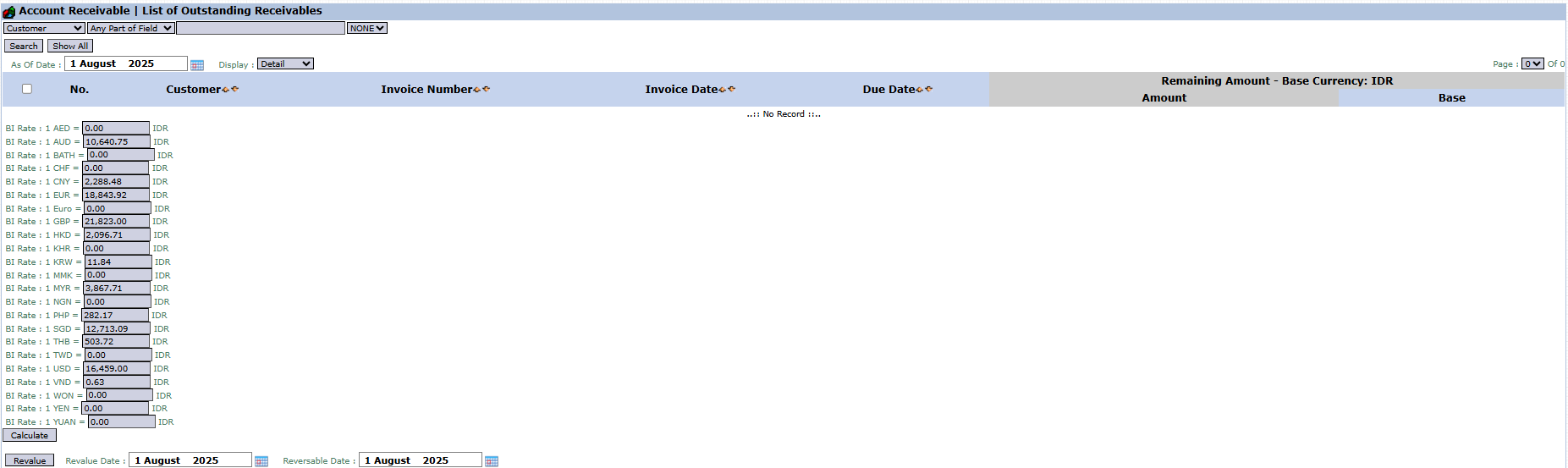
View Explanation & Filters
-
Customer Filter: You can search for receivables from a specific customer using the Customer search bar.
-
Date Filter: The As Of Date parameter is the key filter. Enter a date to see all receivables that are still outstanding as of that date (e.g., August 1, 2025).
-
Receivables List: The table in the middle will display all unpaid invoices according to the selected filters. The table currently shows "...No Record...".
Column Explanation
-
Customer: The name of the customer who has the receivable.
-
Invoice Number: The number of the unpaid sales invoice.
-
Invoice Date: The date the invoice was issued.
-
Due Date: The payment due date for the invoice.
-
Remaining Amount: The remaining balance of the receivable that has not been paid.
2. Usage Steps
A. Viewing the Receivables List
-
Open the Outstanding Receivables module.
-
Set the date in the As Of Date filter according to the period you want to see.

-
Click Show All to display all receivables or use the Customer filter and click Search for a specific customer.


B. Performing a Receivables Revaluation
This process is typically done at the end of the month.
-
Display the receivables list as in the steps above.
-
Update the exchange rate values in the BI Rate table on the left according to the prevailing period-end rates.
-
Select one or more invoices in a foreign currency to be revalued by checking the box in the leftmost column.
-
Click the Calculate button to see the calculation of the foreign exchange gain/loss.
-
Click the Revalue button to process and automatically create the foreign exchange adjustment journal.
Tips & Important Notes
-
Use the As Of Date to view the history of outstanding receivables on a specific date in the past, which is useful for analysis.
-
The Revalue feature is an important accounting process during the monthly closing to ensure the value of foreign currency receivables is presented accurately in the financial statements.
-
This module is the primary work tool for the Accounts Receivable (AR) and Finance teams to manage collections and ensure the accuracy of financial reporting.
No comments to display
No comments to display