The Account Receivable Mutation Detail report module is used to generate a highly detailed accounts receivable mutation report with various advanced filter options. This report is designed for in-depth analysis and complex customer account reconciliations, including the ability to display related payable or deposit transactions.
1. Report Parameters
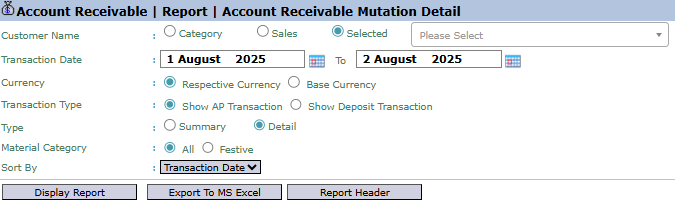
The main page of this module is a form containing various parameters to customize the report that will be generated.
Here is an explanation for each parameter:
Customer Name:
Filter data by customer in various ways: Category, Sales (Salesman), or Selected (to choose one specific customer).
Transaction Date:
Specify the From and To date range to define the mutation period to be displayed (e.g., August 1, 2025, to August 2, 2025).
Transaction Type:
A special filter to include other types of transactions in the receivables report:
Show AP Transaction: To display accounts payable (AP) transactions that could potentially be offset (netted) against the receivable.
Show Deposit Transaction: To display deposit or down payment transactions from the customer.
Type:
Select the report's level of detail: Summary or Detail.
Sort By:
Choose the criteria for sorting the data on the report, for example, by Transaction Date.
Other Filters:
Other filters such as Currency and Material Category are available to further narrow down the report results.
2. Steps to Generate the Report
Step 1: Set Report Parameters
Select all the combinations of parameters you need to generate a highly specific report according to your analysis needs.
Step 2: Generate the Report
After all parameters are set, click one of the buttons in the bottom-left section of the page:
Display Report: To preview the report directly on your screen.
Export To MS Excel: To download the report data in an Excel file format.
Tips & Important Notes
Use this report for in-depth analysis or for complex reconciliation cases where you need to see related payable (AP) or deposit transactions from the customer.
The Sort By feature helps you organize the data for easier analysis, for example, by sorting by transaction date.
This report is a powerful analysis tool for the Accounts Receivable (AR) and Credit Control teams.



No comments to display
No comments to display