The Sales Target module serves as a central hub for setting, managing, and monitoring sales targets for various periods, sales groupings, and products. The data input here becomes the basis or reference for all sales performance comparison reports, such as "Target vs. Actual."
1. Main View (Sales Target List)
The main page of this module displays a list of all Sales Target documents that have been created.
View Explanation
This page is for viewing and managing all targets that have been set.
Filters: You can search for a specific target by Period or other keywords.
Target List: The table below displays a summary of each target, with columns such as SalesTargetNumber, Period, Sales Grouping, Status, and Approval.
Button Functions
New: The primary button to create a new Sales Target.
Delete: To delete a selected target.
2. Steps to Manage a Sales Target
The following is the workflow for setting a new target.
Step 1: Create a New Target
From the Main View, click the New button to open the target entry form.
Step 2: Fill in Product Sales Target Details
You will be directed to a form to fill in the target details, which can be specific per product.
Sales Grouping: Select the sales group or team whose target is being set (e.g., UMS - Mondelez).
Period Code: Enter the code for the target period, for example, "2025M".
Target Value: Enter the total sales target value in the appropriate currency.
File Upload: You can attach a supporting file if available.
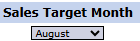
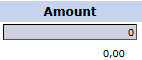
Monthly Target Details: In the detail table below, you can break down the total target into monthly targets. Select the month from the Sales Target Month dropdown and enter the nominal Amount for that month.
Step 3: Save the Target
After all data is filled in, use the buttons in the bottom-left section:
Save: To save the target as a draft.
Confirm: To finalize and send the target into the approval workflow.
Cancel: To cancel the entry.
Workflow & Integrated Business Process
The target data input here will be pulled by the system for performance comparison reports, such as Target vs Actual Sales Stages.
A target that has been Confirmed will likely go to a Sales Target Inbox to be approved by management.
Tips & Important Notes
Ensure the Sales Grouping and Period are correct before saving the target.
This module is the foundation for all sales performance reporting. The accuracy of the data input here is very important.
Use the detail table to break down annual targets into more easily monitored monthly targets.









No comments to display
No comments to display