The Distributor module is a highly comprehensive master data hub, specifically designed to manage all information related to distributor partners. This module not only records basic data but also covers operational capacity, business requirements, and all complex trading terms such as discounts and rebates.
Steps to Manage Distributor Data
To register or edit distributor data, you will go through several detailed sections or tabs.
Step 1: Fill in Distributor Data
This section records the basic legal and contact information of the distributor.
Basic Information: Fill in the Document ID, Customer Code, Customer (Distributor Name), Address, Regional, and other contact details.
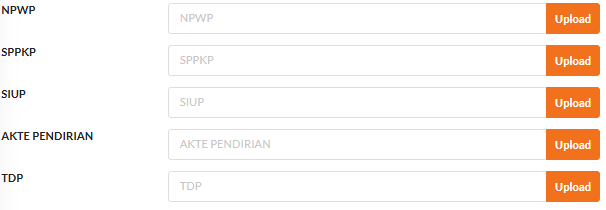
Legal Documents: Upload important documents such as NPWP (Tax ID Number), SPPKP (Taxable Entrepreneur Confirmation Letter), SIUP (Business Trading Permit), AKTE PENDIRIAN (Deed of Establishment), and TDP (Company Registration Certificate) using the available Upload buttons.
Step 2: Fill in Distributor Condition
This section documents the operational capacity and market reach of the distributor.
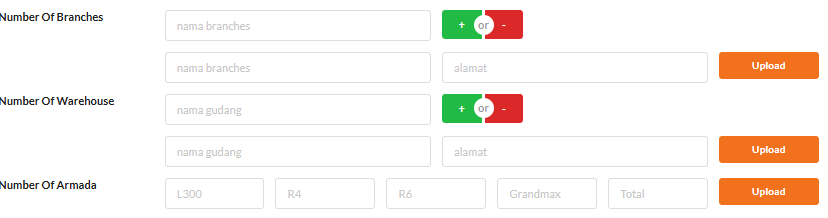
Operational Capacity: Enter data such as Number Of Branches, Number Of Warehouse, Number Of Armada (Fleet), and Number Of Salesman.
Other Business Information: Complete data such as Sales Target, information on Cooperation with Other Principals, and Distribution Area.
Step 3: Fill in Business Condition
This section defines the financial requirements and formal agreements with the distributor.
Agreement: Enter details such as MOU Number, MOU Valid Date, Regional, and Product.
Financial & Credit: Set up information for Bank Guarantee, Credit Limit, Limit Over Due, and Payment Term.
Step 4: Set Up Trading Terms
This is the most detailed section that governs all commercial schemes with the distributor.
Discounts & Rebates: For each type of program (e.g., Disc Regular, Fixed Rebate, Opening New Store, Promo Fund, Return), fill in the percentage column (%) as well as the start period (p.awal) and end period (p.akhir) for the program's validity.
Step 5: Save and the Approval Process
After all data in all sections has been completely filled in:
Review all the information that has been input.
Click the Save button to save the new distributor data or existing changes.
The saved document will then go through the internal approval workflow shown at the bottom of the form (Submit by DBDL, Approve by LEAD, etc.).
Tips & Important Notes
This module is the single source of truth for all commercial agreements with distributors. Ensure all data, especially in the Trading Term section, is filled in accurately.
The discount and rebate settings here will likely be automatically applied to every sales transaction made by that distributor.
The comprehensive data entry required for this module necessitates coordination between various teams, such as the Sales, Finance, and Legal teams.












No comments to display
No comments to display