The Aged Payables report module is used to generate an accounts payable aging report. This report categorizes unpaid invoices from suppliers (vendors) into "aging buckets" based on how long the invoices have been outstanding or are approaching their due date. It is a crucial tool for managing cash outflow and planning payments.
1. Report Parameters (Filter)
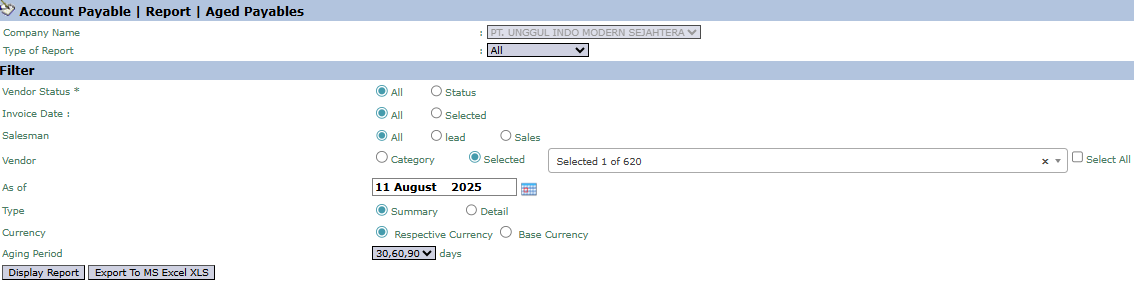
The main page of this module is a form containing various parameters to customize the aged payables report that will be generated.
Here is an explanation for each key parameter:
Vendor:
Although some labels may say 'Customer', this filter is used to select the Vendor or Supplier. You can select by Category or Selected (Specific Vendor).
As of:
Specify the "cut-off" date for the report. The system will calculate the age of the payables as of this date (e.g., August 11, 2025).
Type:
Select the report's level of detail: Summary or Detail.
Aging Period:
Use this field to define the interval for the aging buckets in days. Standard entries like 30,60,90 will group payables into intervals of 0-30 days, 31-60 days, 61-90 days, and >90 days.
2. Steps to Generate the Report
Step 1: Set Report Parameters
Select all the parameters you need, especially defining the As of date and filling in the Aging Period field to set the report's intervals.
Step 2: Generate the Report
After all parameters are set, click one of the two buttons in the bottom-left section of the page:
Display Report: To preview the aged payables report directly on your screen.
Export To MS Excel XLS: To download the report data in an Excel file format.
3. Example of the Report View
After you click, the system will generate a detailed report like the following, which details the age of payables per vendor.
Report Explanation: This report presents a summary of aged payables per vendor.
Key Columns for Analysis:
Accrual Account Payable: Payables that are still accrued or do not yet have an official invoice.
0-30 days, 30-60 days, etc.: These columns are the "aging buckets" that show the value of payables due within that time frame.
Total Aging: The total of all outstanding payables.
Tips & Important Notes
The Aged Payables report is a primary tool for the Finance and Accounting (AP - Account Payable) teams to plan and manage the payment schedule to vendors.
Use this report to ensure all invoices are paid on time according to their due dates and to take advantage of payment discounts (if any).
This report provides a clear picture of the company's short-term liabilities that must be met.






No comments to display
No comments to display