
Sales Regional
Module Guide: Sales Region
Module Location
Sales > Sales Region
Module Objective
The Sales Region module is a tool for managing master data related to sales regions or territories. Its purpose is to define geographical sales areas, and to view and group customers based on their region. This setup is crucial as a basis for reports and sales analysis per region.
1. Main View (Sales Region List)
The main page of this module displays a list of all created sales regions along with the customers that belong to them.
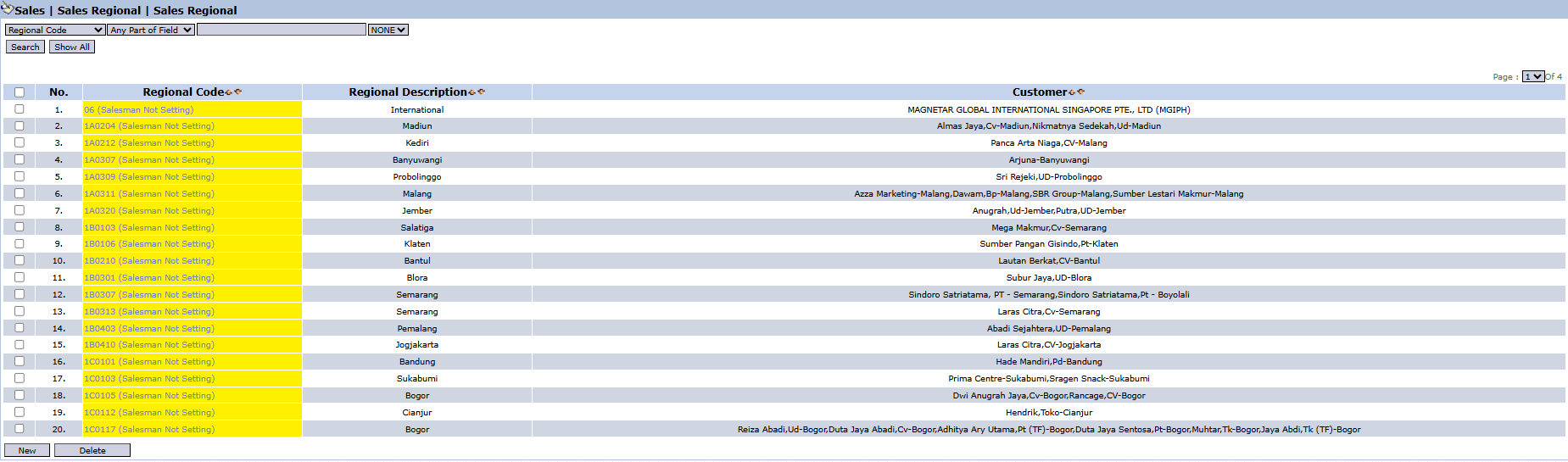
View Explanation
This page is the center for viewing and managing all sales region data.
-
Filter: You can search for a specific region using the search bar based on the Regional Code.
-
Region List: The table below displays all existing sales regions.
Column Explanation
-
Regional Code: The unique code for each sales region (e.g., SA0104, SA0207).
-
Regional Description: The name or description of the region (e.g., Madiun, Banyuwangi, Malang).
-
Customer: A list of customers who are included in that sales region.
Button Functions
-
New: The primary button to create new Sales Region data.
-
Delete: To delete a selected sales region data.
2. Steps to Manage a Sales Region
Step 1: Create a New Region
From the Main View, click the New button to open the new region creation form.

Step 2: Fill in Region Details
On the form that appears (not shown in the image), you will be asked to fill in the Regional Code (a unique code for the region) and the Regional Description (the name of the region, e.g., Surabaya, Malang, Central Jakarta). 
Step 3: Add Customers to the Region
After the region is defined, you will be able to associate or add customers to that region. This process ensures every customer is mapped correctly. 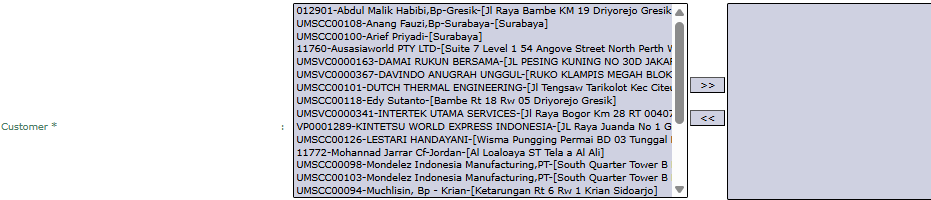
Step 4: Save the New Region
Save the data to create the new sales region. The data will then appear in the Main View.

Tips & Important Notes
-
These Sales Region settings are important master data for all sales reports that are analyzed by geographical area.
-
Ensure every new customer is allocated to the correct sales region to make the sales data per region accurate.
-
The information "(Salesman Not Setting)" that might appear in the Regional Code column could indicate that no specific salesperson has been assigned to handle that region or customer.
No comments to display
No comments to display