The Sales Contract Report module is used to generate a detailed list of all Sales Contracts that have been created. This report is used to review the terms and conditions, period, as well as the product and price details within long-term agreements with customers.
1. Report Parameters (Filter)
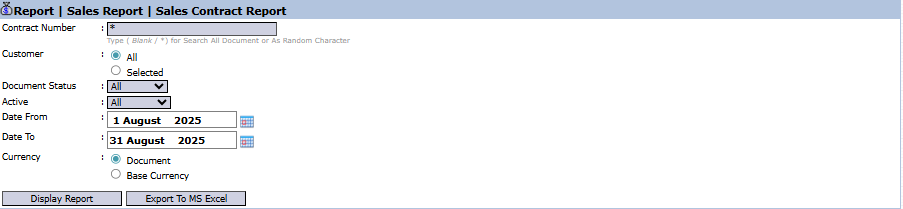
The main page of this module is a form containing various parameters to customize the report that will be generated.
Here is an explanation for each parameter:
Contract Number:
Use this field to search for a report by a specific contract number.
Customer:
Filter the report by All customers or a Selected customer.
Document Status / Active:
Use this dropdown to filter contracts based on their document status or active status.
Date From / To:
Specify a date range to display contracts that are relevant within that period (e.g., August 1, 2025, to August 31, 2025).
Currency:
Choose how currency values will be displayed: Document or Base Currency.
2. Steps to Generate the Report
Step 1: Set Report Parameters
Select all the parameters you need, especially defining the date range and the customer scope.
Step 2: Generate the Report
After all parameters are set, click one of the two buttons in the bottom-left section of the page:
Display Report: To preview the contract report directly on your screen.
Export To MS Excel: To download the report data in an Excel file format.
3. Example of the Report View
After you click, the system will generate a detailed report like the following, which details every sales contract.
Report Explanation: This report displays a very detailed list of each sales contract along with the items within it.



No comments to display
No comments to display