The Bank List module serves as the master data hub for registering and managing all of the company's bank accounts. The settings in this module are crucial because each registered bank account will be linked to a specific account in the Chart of Accounts, thereby ensuring every bank transaction is recorded in the correct account.
1. Main View (Bank Account List)
The main page of this module displays a list of all the company's bank accounts that have been registered in the system.
View Explanation & Filters
This page is for viewing and managing all bank account data.
Filter: You can search for a specific bank account using the search bar based on Bank Name.
Bank List: The table below displays a summary of each account, with columns such as Bank Name, Bank Branch, Bank Account, and Currency.
Button Functions
[Add]: The primary button to register a new bank account.
[Delete]: To delete a selected bank account's data.
2. Steps to Add a New Bank Account
Step 1: Add New Data
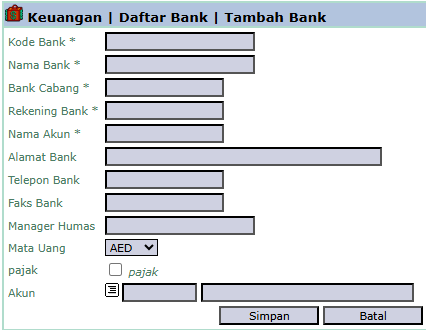
From the Main View, click the Add button to open the Add Bank form.
Step 2: Fill in Bank Details
On the form that appears, fill in all the relevant operational details of the bank account:
Bank Code, Bank Name, Bank Branch
Bank Account (Account Number) and Account Name (Account Owner Name)
The Currency of the account.
Step 3: Link to the General Ledger Account (Important!)
In the Account field, click the [...] icon to select the corresponding cash/bank account from the Chart of Accounts.
This step is crucial as it will link this physical bank account with its accounting record in the system.
Step 4: Save the Data
After all data has been filled in correctly, click the Save button to save the new bank account data.
Tips & Important Notes
The bank data you create here will become the options in the 'Cash Book Account' dropdown in all cash/bank transaction modules, such as Bank Receipt and Bank Disbursement.
Ensure you link each bank account to the correct General Ledger Account. An error in this step will cause recording errors in the financial statements.
This is a fundamental master data setup that must be managed by the Treasury or Accounting team.


No comments to display
No comments to display