
Weekly Delivery
Report Module Guide: Weekly Shipping Report
Module Location
Sales > Reports > Shipping Reports > Weekly Shipping (Note: The title in the system indicates this report is related to PPIC | Report | Detail Production Report)
Module Objective
The Weekly Shipping report module is used to generate a comparative report between the shipping Plan and the Actual realization within a single week. This report is an important Key Performance Indicator (KPI) for monitoring the on-time performance and fulfillment of the shipping schedule by the logistics and production teams.
1. Report Parameters
The main page of this module is a simple form for selecting the report period.
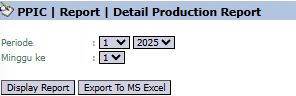
Here is an explanation for each parameter:
-
Period:
-
Select the month and year of the report period you wish to see.
-
-
Week number:
-
Select the week number within that month that you want to analyze (e.g., week 1, 2, 3, or 4).
-
2. Steps to Generate the Report
Step 1: Set Report Parameters
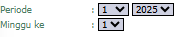
Select the Period (month and year) as well as the Week number to be analyzed.
Step 2: Generate the Report
After the parameters are set, click one of the two buttons at the bottom:
-
Display Report: To preview the comparison report directly on your screen.

-
Export To MS Excel: To download the report data in an Excel file format.

3. Reading the Weekly Shipping Report
The generated report will present a detailed comparison between the plan and the realization.

Report Explanation: This report is designed for in-depth Plan vs. Actual analysis.
-
Daily Breakdown: The Week 1 section details the Plan and Act (Actual) comparison for each working day (dates 01 to 05).
-
Weekly Total & Commitment: The Total Week 1 and Shipping Commitment Week 1 columns summarize the performance for the full week.
-
Analysis Columns:
-
%: Shows the percentage of shipping target achievement.
-
Gap: Shows the difference or gap between the planned quantity and the realized quantity.
-
Tips & Important Notes
-
This report is a crucial performance measurement tool for the PPIC (Production Planning and Inventory Control) and Logistics teams.
-
Use this report to identify delays or problems in fulfilling the shipping schedule early and to take corrective action.
-
The 'Plan' data is likely pulled from a forecast or master production schedule, while the 'Act' data is pulled from actual shipping documents like Delivery Orders.
No comments to display
No comments to display