The Sales Invoice report module is used to generate a list or summary of all sales invoices that have been issued within a specific time period. This report is a basic tool for tracking total sales, monitoring revenue, and serving as a reference for collection activities by the Accounts Receivable (AR) team.
1. Report Parameters
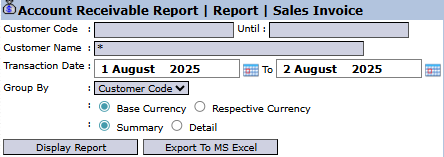
The main page of this module is a form containing various parameters to customize the report that will be generated.
Here is an explanation for each parameter:
Customer Code / Customer Name:
Use these fields to filter the report to show invoices for a specific customer only. The Customer Name field is mandatory (*).
Transaction Date:
Specify the From and To date range to define the report's period (e.g., August 1, 2025, to August 2, 2025).
Group By:
Use this dropdown to group the data in the report, for example, by Customer Code to see the total sales per customer.
Currency:
Choose how currency values will be displayed: Base Currency or Respective Currency (original transaction currency).
Report Type:
Select the report's level of detail: Summary or Detail.
2. Steps to Generate the Report
Step 1: Set Report Parameters
Select all the parameters you need, especially defining the Transaction Date range and the data grouping method in the Group By field.
Step 2: Generate the Report
After all parameters are set, click one of the two buttons in the bottom-left section of the page:
Display Report: To preview the sales invoice report directly on your screen.
Export To MS Excel: To download the report data in an Excel file format.
Tips & Important Notes
This report is a recapitulation of all invoices created in the Sales Module. Use it to verify total sales within a period.
The Group By feature is very useful for creating concise summary reports, for example, to see the total sales per customer in a month.
This is a fundamental report for the Accounts Receivable (AR) and Sales teams.




No comments to display
No comments to display