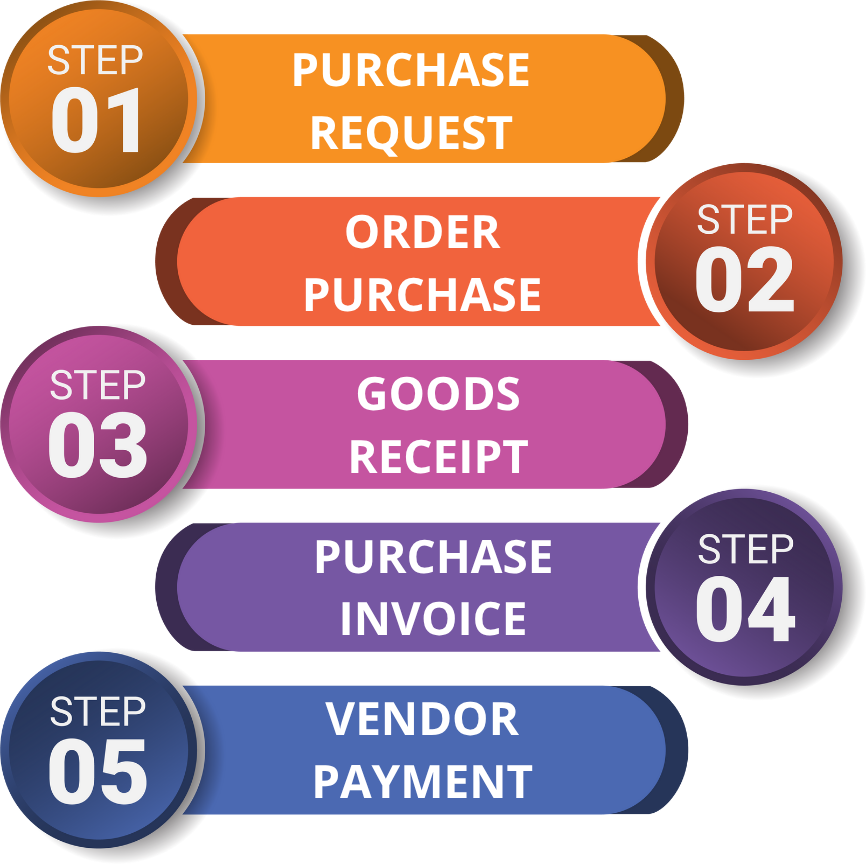
This flow covers the entire process of goods/services procurement, from the request by the user department to payment to the vendor. The main departments are Procurement, Warehouse, and Finance.
Process Flow Visual
Process Steps in the ERP System
Create a Purchase Request (PR)
- PIC (Person in Charge): All User Departments.
- When to Perform: When a department needs goods or services, they create a PR in the system via the Purchase Request menu. This document will go through approval before being forwarded to the Procurement department.
- Modul Terkait: Pembelian.
Creating a Purchase Order (PO)
- PIC: Procurement.
- When It Is Done: After the PR is approved, the Procurement team selects a vendor and creates the PO through the Purchase Order menu. This PO is the official document sent to the vendor as an order.
- Related Module: Purchasing.
Goods Receipt at Warehouse
- PIC: Warehouse.
- When It Is Done: When the vendor delivers goods, the Warehouse team creates a Goods Receipt document through the Goods Receipt menu, referring to the PO number. Once this document is saved, the system inventory stock increases.
- Related Module: Inventory.
Invoice Verification & Vendor Payment
- PIC: Finance, Procurement.
- When It Is Done: The Finance/Procurement team receives invoices from vendors and records them in the Purchase Invoice menu. After verification, the liability is recorded and payment is scheduled through the Accounts Payable module > Vendor Payment.


No comments to display
No comments to display