
Promo Authorization Inbox
Module Location:
PAF > Promo Authorization Inbox
-
Main Page View
The Promo Authorization Inbox main page displays a list of PAF documents related to the approval process. This page is used to monitor Promo Authorization documents requiring approval, view the results of the approval process, and open document details for review before Approving, Revising, or Rejecting them. The information displayed helps users stay informed about the current status of each PAF document in the approval workflow.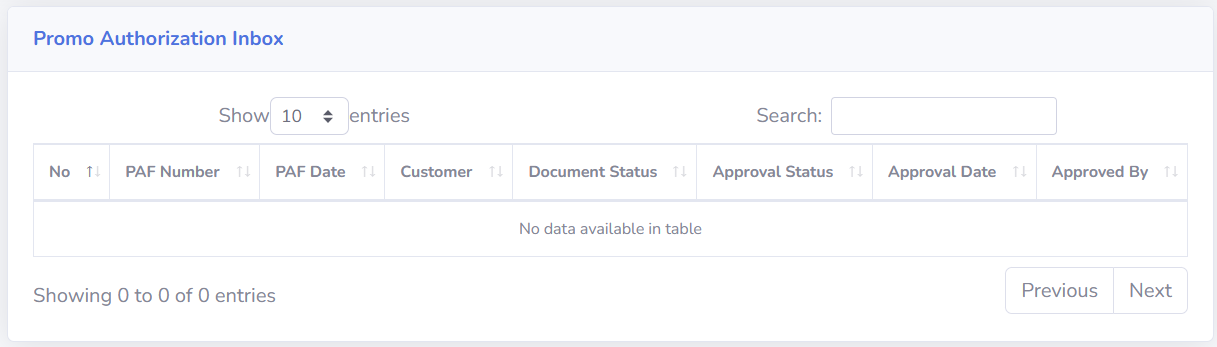
-
Screen Description
The columns available in the Promo Authorization Inbox include:
-
No: Displays the sequential number of the data in the table.
-
PAF Number: Displays the Promo Authorization document number. Click PAF Number to open the PAF details page.
-
PAF Date: Displays the date of the Promo Authorization document.
-
Customer: Displays the name of the customer associated with the PAF document.
-
Document Status: Displays the current status of the Promo Authorization document.
-
Approval Status: Displays the status of the Promo Authorization document approval process.
-
Approval Date: Displays the date the approval process was conducted.
-
Approved By: Displays information about the party who performed the approval process.
-
-
Approval Process
Once the Promo Authorization details have been accessed via the PAF Number, users can take actions based on the document’s conditions and their access rights. Available actions include:
-
Approve: Used to approve the Promo Authorization document
- Revise: Used if the document needs to be corrected or completed before it can be approved.
- Reject: Used to reject the Promo Authorization document.
If you select Revise or Reject, clearly state the reason in the notes so that the relevant parties can understand why the document is being revised or rejected.
-
-
Tips & Important Notes
-
Ensure that the Current Company is correct so that the Promo Authorization Inbox data displayed matches the company to be processed.
-
Click the PAF Number to open and review the document details before proceeding with the approval process.
Review the customer, promo period, forecast value, total cost, ratio, and supporting documents before approving the PAF.
-
Check the Document Status to determine the status of the Promo Authorization document.
-
Check the “Approval Status” to track the progress of the document approval process.
-
The “Approval Date” information can be used to determine when the approval process took place.
-
The “Approved By” information can be used to identify the person who performed the approval.
-
Ensure that the actions “Approve,” “Revise,” or “Reject” are taken in accordance with the document’s status and the user’s authority.
-
If you select “Revise,” provide notes explaining which parts need to be corrected or completed.
-
If you select “Reject,” provide a clear reason for the rejection so that the document creator can understand it.
Carefully review all information before approving, as the approval action may affect subsequent document processes.
-
No comments to display
No comments to display