
Promo authorization Form
PAF (Promo Authorization Form) Module Guide
Module Location:
PAF > Promo Authorization Form
-
Promo Authorization Form View
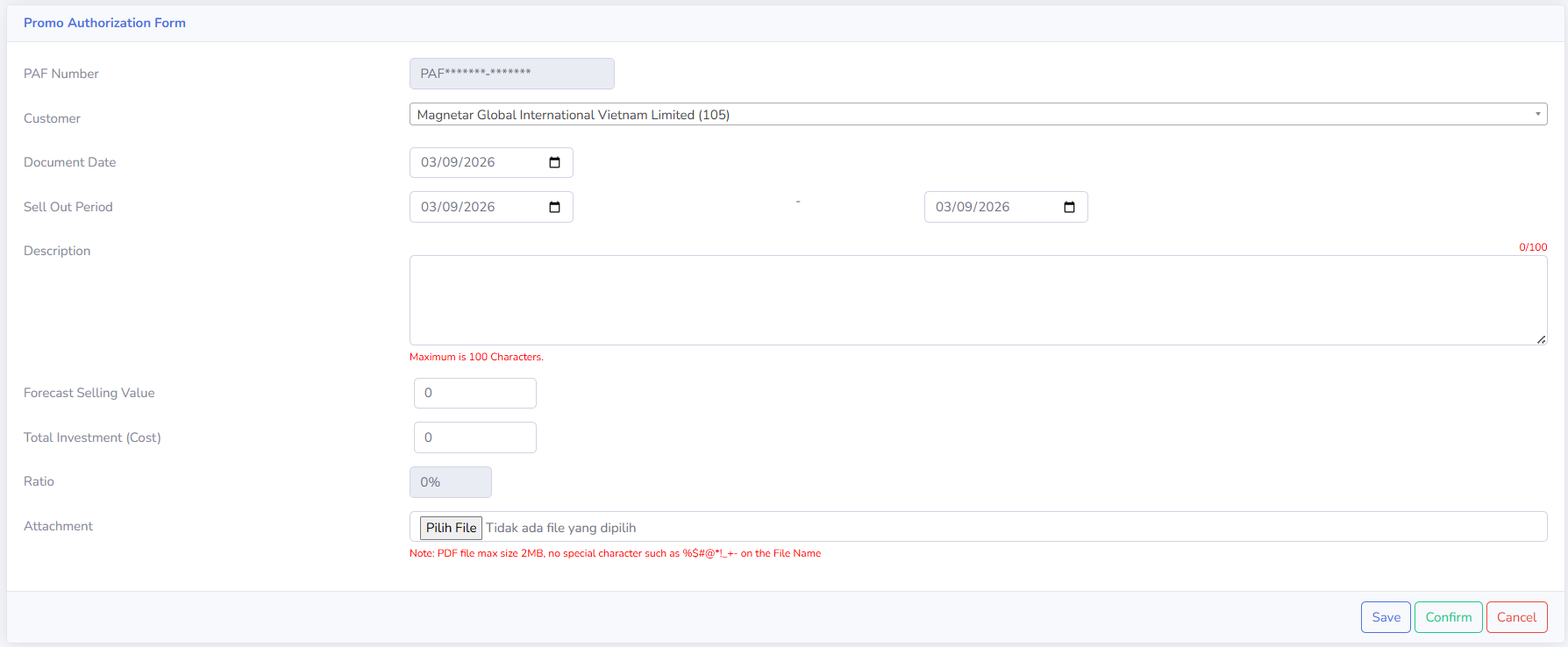
The Promo Authorization Form page appears when a user creates a new PAF document or opens a document that can still be edited. This page is used to fill in all the information required for a promotional program submission before the document is saved, confirmed, and forwarded to the approval process. Ensure that all information on the form has been filled out correctly and in accordance with the submitted promotional program before continuing the process.
-
Form Explanation
- PAF Number
Displays the identification number of the Promo Authorization document. The PAF Number is provided or generated by the system as the unique identifier for each document. -
Customer
Used to select the customer associated with the promotional program to be submitted - Document Date
Used to specify the date of the Promo Authorization document.
-
Sell-Out Period
Used to specify the duration of the promotional program.
This period consists of the start date and end date of the promotional program.
- Description
Used to add a brief description of the promotional program.
The description can be up to 100 characters long.
- Forecast Selling Value
Used to enter the estimated target sales value during the promotional program period. - Total Investment
Used to enter the total cost or investment allocated for the promotional program. -
Ratio
Displays the percentage ratio based on the Forecast Selling Value and Total Investment (Cost). Check the Ratio value to ensure the comparison between the estimated sales value and the program cost is appropriate.
-
Attachment
Used to attach supporting documents related to the promotional program. Attachment requirements:
-
Files must be in PDF format.
-
Maximum file size is 2 MB.
-
Please avoid using special charcters in files names
-
- PAF Number
-
Buttons on the Form
- Save
Used to save Promo Authorization data. Use Save if the document still needs to be completed or reviewed before proceeding to the next step.
- Confirm
Used to confirm the Promo Authorization document after all information has been reviewed. Make sure all data is correct before clicking Confirm.
- Cancel
Used to cancel the process of filling out or changing data on the form
- Save
-
Tips & Important Notes
-
Pastikan Customer yang dipilih sudah sesuai sebelum mengisi data lainnya.
-
Periksa kembali Document Date agar tanggal dokumen Promo Authorization tercatat dengan benar.
-
Pastikan tanggal awal dan tanggal akhir pada Sell Out Period sesuai dengan periode berlangsungnya program promo.
-
Isi Description secara singkat, jelas, dan maksimal 100 karakter.
-
Pastikan nilai Forecast Selling Value telah sesuai dengan estimasi penjualan yang ditargetkan selama program promo.
-
Pastikan Total Investment (Cost) telah sesuai dengan biaya atau investasi yang direncanakan.
-
Periksa nilai Ratio sebelum menyimpan atau mengonfirmasi dokumen.
-
Pastikan dokumen pendukung telah dilampirkan apabila diperlukan.
-
Attachment harus menggunakan format PDF dengan ukuran maksimal 2 MB.
-
Hindari penggunaan karakter khusus pada nama file attachment untuk mengurangi kemungkinan kendala saat proses upload.
-
Gunakan Save apabila data masih perlu disimpan atau dilengkapi terlebih dahulu.
-
Gunakan Confirm setelah seluruh informasi dan dokumen pendukung telah diperiksa.
-
Periksa kembali customer, periode promo, nilai penjualan, biaya, ratio, dan attachment sebelum melakukan Confirm.
-
Setelah dokumen dikonfirmasi, pantau Document Status dan Approval Status untuk mengetahui perkembangan proses dokumen.
-
No comments to display
No comments to display