
Promo Authorization
Promo Authorization Module Guide
Module Location
PAF > Promo Authorization
-
Main Page View
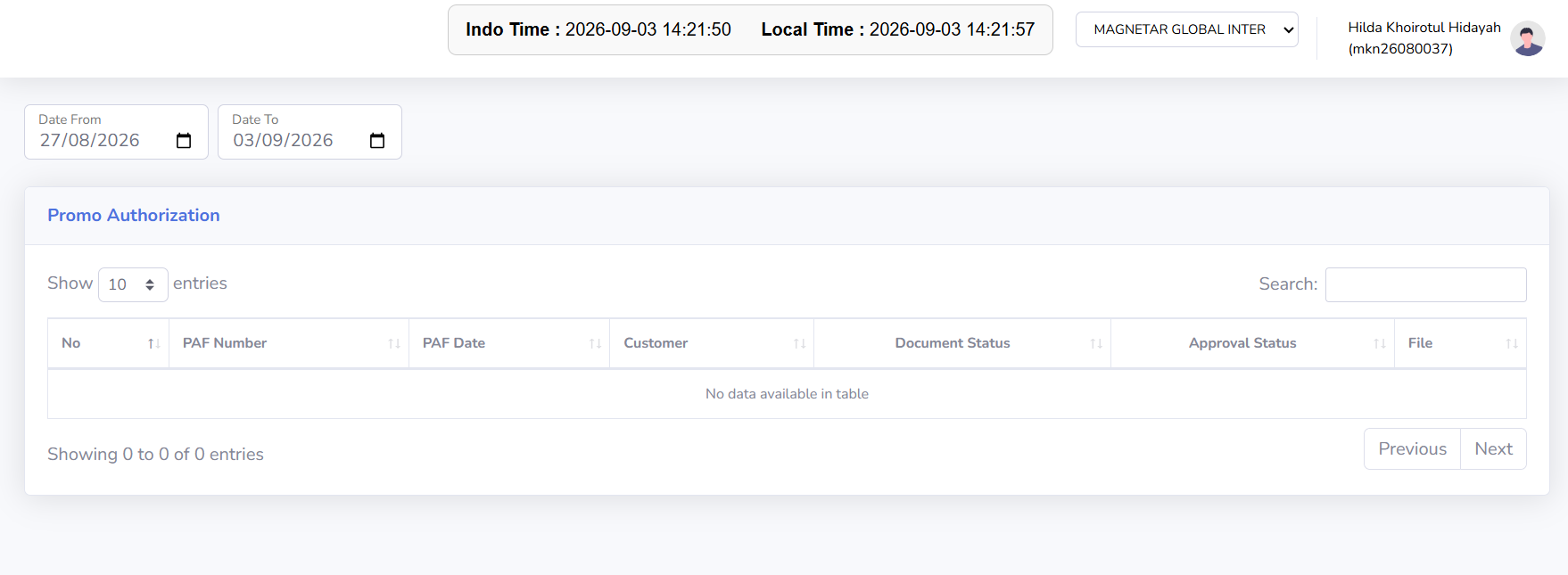
The Promo Authorization main page displays all PAF documents created for the currently active company. This page is used to view and search for Promo Authorization documents based on a specific period, open document details, and monitor document status and the PAF approval process. The data displayed in the table will adjust according to the company and date range selected by the user.
-
Screen Description
The Promo Authorization page contains several sections designed to help users view and search for PAF documents.
-
Current Company: Displays the currently active company. The Promo Authorization data displayed will correspond to the selected company.
-
Add Data: Used to create a new Promo Authorization document.
-
Date From: Used to specify the start date of the document search period.
-
Date To: Used to specify the end date of the document search period.
-
Show Entries: Used to specify the number of records displayed per page.
-
Search: Used to search for Promo Authorization documents based on specific keywords.
- Previous / Next: Used to navigate between pages if the number of records exceeds the page limit.
-
-
Promo Authorization Table
The Promo Authorization Table displays a list of PAF documents based on the selected company and period. The information displayed may include:
-
PAF Number: Displays the Promo Authorization document number. Click the number to view the document details.
-
PAF Date: Displays the date of the Promo Authorization document.
-
Customer: Displays the customer associated with the promotional program.
-
Document Status: Displays the current status of the Promo Authorization document.
-
Approval Status: Displays the status of the Promo Authorization document’s approval process.
-
Created By: Displays the user who created the document, if available.
-
Created Date: Displays the document’s creation date, if available.
-
-
Tips & Important Notes
-
Make sure the Current Company is correct before creating or searching for a Promo Authorization document.
-
Use Date From and Date To to narrow down the range of documents displayed.
-
Use Search to find a specific PAF more quickly.
-
Use the PAF Number to open and view the details of a Promo Authorization document.
-
Check the Document Status to see the document’s current status.
-
Check the Approval Status to track the progress of the document’s approval process.
-
Make sure the customer and promo period are correct before proceeding with the document.
-
Double-check all PAF information before the document is confirmed or forwarded to the approval process.
-
Avoid creating duplicate Promo Authorization documents if a document for that promo program already exists.
-
Make sure the required supporting documents are available before the PAF is forwarded to the next step.
-
No comments to display
No comments to display