
BC 4.0
Customs Documents Module Guide
Module Location:
CEISA > Customs Documents > BC 4.0
Page Display
Displays a list of submissions for goods entering the TPB.
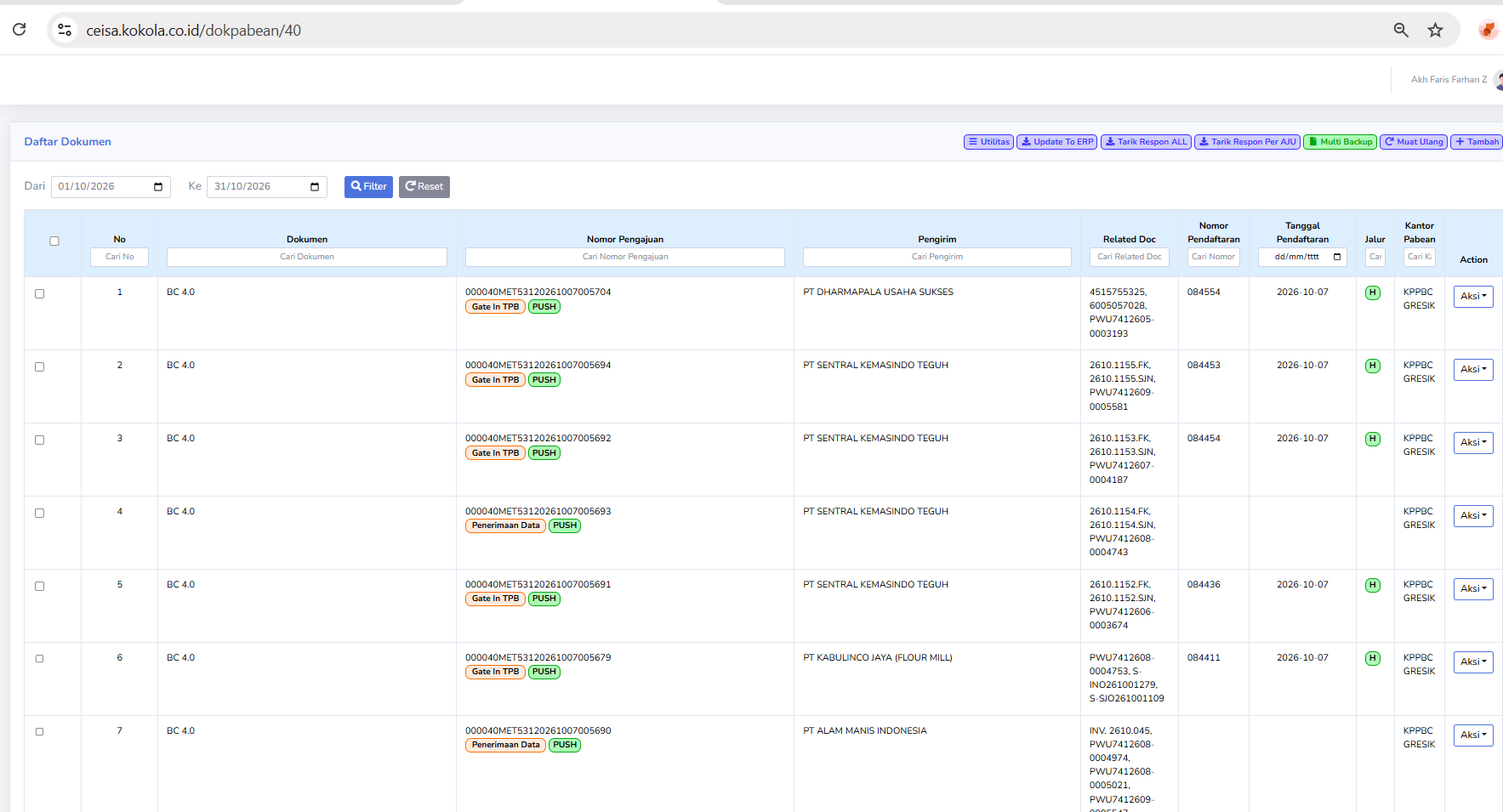
Column Descriptions
The available columns include:
- No.: Displays the document’s sequential number in the list.
- Document: Displays the type of customs document, namely BC 4.0.
- Submission Number: Displays the AJU number as the document submission identifier.
- Sender: Displays the name of the company or party sending the goods.
- Related Doc: Displays the reference document number related to the submission, such as an invoice or shipping document.
- Registration Number: Displays the document registration number assigned through the customs process.
- Registration Date: Displays the date the document was registered.
- Lane: Displays the customs service lane indicator, such as Green Lane or Red Lane.
- Customs Office: Displays the Customs Office handling the document.
- Action: Displays options for further actions on the selected document.
Button Descriptions
- Utilities: Opens a menu of additional features for document management.
- Update to ERP: Used to update or synchronize document data with the company’s ERP system.
- Retrieve ALL Responses: Used to retrieve or update customs responses for a number of documents.
- Retrieve Response by AJU: Used to retrieve responses based on a specific submission number.
- Multi Backup: Used to back up multiple documents at once.
- Reload: Refreshes the document list view.
- Add: Used to create a new BC 4.0 document submission.
- Filter: Displays documents based on the selected date range.
- Reset: Restores the search filter to its default settings.
Explanation of Status and Channels
The document list includes several indicators that help users monitor the submission process:
- Gate In TPB: Relates to the process of recording the entry of goods through the Bonded Warehouse gate.
- PUSH: An application indicator believed to be related to the data transmission or synchronization process.
- H (Green): Presumably indicates the Green Lane, which is a goods entry lane that generally does not require routine physical inspections, except under certain conditions.
- Red Lane: A service lane that requires further supervision or inspection in accordance with customs regulations.
Note: The H and PUSH codes in the application must be aligned with the system’s status definitions. The lane status also does not always indicate that the entire goods import process has been completed.
Usage Steps
Notes
- Make sure the search period matches the document you want to check.
- The Application Number and Registration Number serve different purposes.
- A single BC 4.0 document can have multiple reference documents.
- Check the customs response to confirm the document processing results.
- Ensure that the data to be synchronized to the ERP is correct.
- Use the Action menu as needed for document management.
No comments to display
No comments to display