Skip to main content
Profit & Loss
Report Module Guide: Profit & Loss
Module Location
General Ledger > Reports > Profit & Loss
Module Objective
The Profit & Loss module is used to generate the Profit & Loss Statement, which presents a company's financial performance by summarizing all Revenues and Expenses over a specific period of time. The module provides various parameter options to customize the report for your analysis needs, including flexible currency options.
1. Profit & Loss Report Parameters (Profit & Loss Filter)
The main page of this module is a form containing various parameters to customize the report that will be generated.
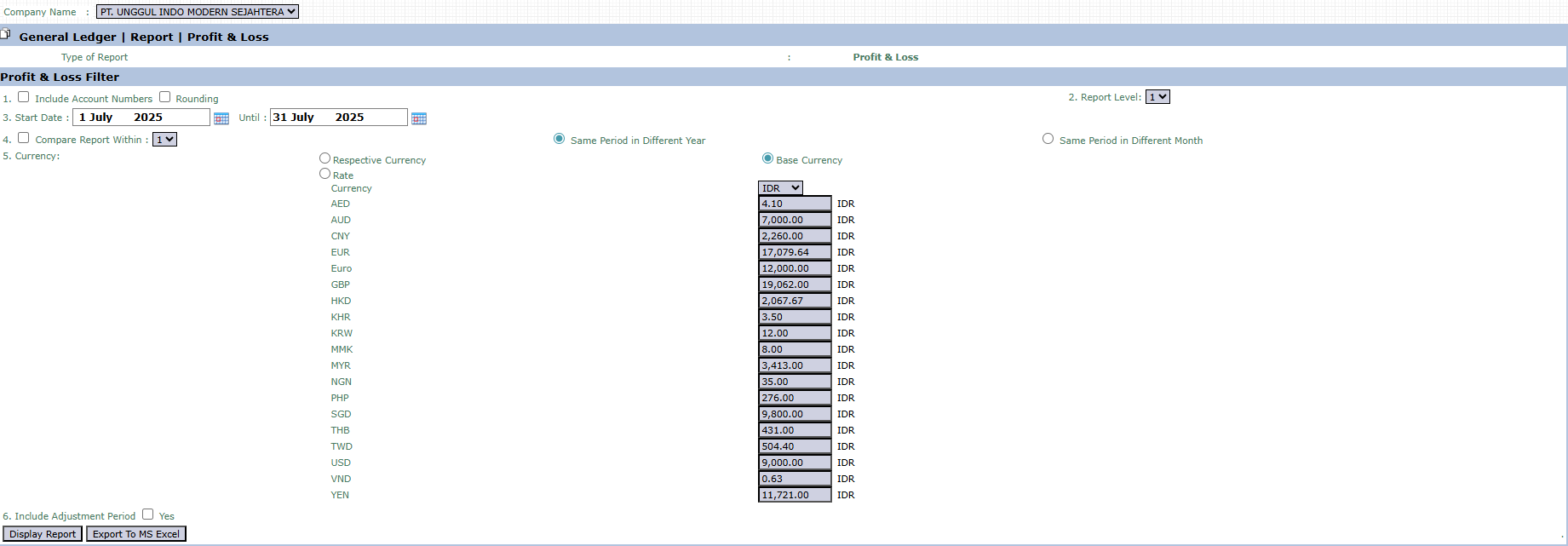
Here is an explanation for each parameter:
-
Include Account Numbers / Rounding:
-
Check Include Account Numbers to display account codes on the report.
-
Check Rounding to round the monetary values on the report.
-
Report Level:
-
This dropdown is used to set the report's level of detail (e.g., summary or detailed).
-
Start Date / Until:
-
The most important parameters that define the report's time period. Enter the start and end dates of the period to be analyzed (e.g., July 1, 2025, to July 31, 2025).
-
Compare Report Within:
-
Activate this feature to create a comparative report with the same period in a different year or a different month.
-
Currency:
-
Choose how currency values will be displayed.
-
Respective Currency: Will display values in the original currency of each transaction.
-
Base Currency: Will convert all transactions to the company's base currency (e.g., IDR) based on existing exchange rates.
-
Include Adjustment Period:
-
Check Yes if you want to include adjusting entries in the profit and loss calculation.
2. Steps to Generate the Report
The process to create a Profit & Loss report is very easy:
Step 1: Set Report Parameters
Fill in or select all the parameters you need in the Profit & Loss Filter section to ensure the generated report matches the scope of your analysis.
Step 2: Generate the Report
After all parameters are set, click one of the two buttons in the bottom-left section of the page:
-
Display Report: To preview the report directly on your screen. 
-
Export To MS Excel: To download the report data in an Excel file format.

Tips & Important Notes
-
The Profit & Loss Statement is a report of financial performance for a period of time. Ensure the Start Date and Until date range is correct.
-
Use the Currency option to analyze performance in a specific foreign currency. This is very useful for reports related to International Business activities.
-
Take advantage of the Export To MS Excel feature for further analysis, such as calculating profitability ratios or creating performance graphs for presentations.
