Skip to main content
Performance Each Account Officer
Report Module Guide: Performance Each AO
Module Location
CRM > CRM Reports > Performance Each AO
Module Objective
1. Report Parameters
The main page of this module is a form containing various parameters to customize the performance report that will be generated.
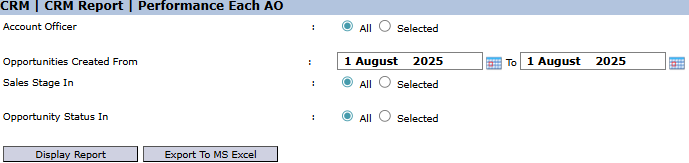
Here is an explanation for each parameter:
-
Account Officer:
-
Select All to display the performance report for all salespeople, or select Selected to choose one or more specific salespeople to be evaluated.
-
Opportunities Created From / To:
-
Specify the opportunity creation date range to define the performance evaluation period (e.g., August 1, 2025).
-
Sales Stage In:
-
Filter the report to only display opportunities that are in a specific sales stage. Select All to include all stages.
-
Opportunity Status In:
-
Filter the report based on the final status of the opportunities. For example, select "Won" to see the win-rate, or "Lost" to see failed opportunities. Select All to include all statuses.
2. Steps to Generate the Report
Step 1: Set Report Parameters
Select all the parameters you need to focus the report. For example, to see a salesperson's winning performance last month, select the Account Officer's name, set the date range to the previous month, and set the Opportunity Status In to "All".

Step 2: Generate the Report
After all parameters are set, click one of the two buttons in the bottom-left section of the page:
-
Display Report: To preview the performance report directly on your screen. 
-
Export To MS Excel: To download the report data in an Excel file format.

Tips & Important Notes
-
This report is a primary evaluation tool for Sales Managers to objectively assess the performance of each member of their team based on data.
-
To see how many deals a salesperson won in a specific period, set the date range and filter the Opportunity Status In to "Won".
-
The accuracy of this report is highly dependent on the salesperson's discipline in managing data in the Opportunity Module, especially in updating its status to "Won" or "Lost" when a deal is concluded.
