Skip to main content
Account Receivable Mutation Detail
Report Module Guide: Account Receivable Mutation Detail
Module Location
Accounts Receivable > Reports > Account Receivable Mutation Detail
Module Objective
The Account Receivable Mutation Detail report module is used to generate a highly detailed accounts receivable mutation report with various advanced filter options. This report is designed for in-depth analysis and complex customer account reconciliations, including the ability to display related payable or deposit transactions.
1. Report Parameters
The main page of this module is a form containing various parameters to customize the report that will be generated.
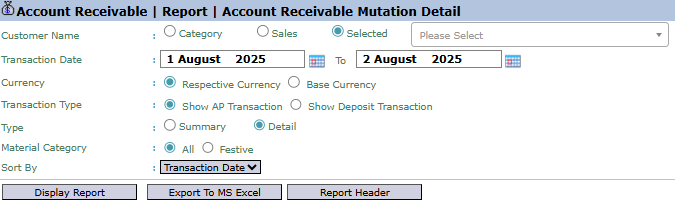
Here is an explanation for each parameter:
-
Customer Name:
-
Filter data by customer in various ways: Category, Sales (Salesman), or Selected (to choose one specific customer).
-
Transaction Date:
-
Specify the From and To date range to define the mutation period to be displayed (e.g., August 1, 2025, to August 2, 2025).
-
Transaction Type:
-
A special filter to include other types of transactions in the receivables report:
-
Show AP Transaction: To display accounts payable (AP) transactions that could potentially be offset (netted) against the receivable.
-
Show Deposit Transaction: To display deposit or down payment transactions from the customer.
-
Type:
-
Select the report's level of detail: Summary or Detail.
-
Sort By:
-
Choose the criteria for sorting the data on the report, for example, by Transaction Date.
-
Other Filters:
-
Other filters such as Currency and Material Category are available to further narrow down the report results.
2. Steps to Generate the Report
Step 1: Set Report Parameters
Select all the combinations of parameters you need to generate a highly specific report according to your analysis needs.
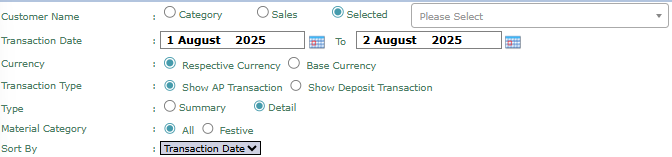
Step 2: Generate the Report
After all parameters are set, click one of the buttons in the bottom-left section of the page:
-
Display Report: To preview the report directly on your screen.

-
Export To MS Excel: To download the report data in an Excel file format.

Tips & Important Notes
-
Use this report for in-depth analysis or for complex reconciliation cases where you need to see related payable (AP) or deposit transactions from the customer.
-
The Sort By feature helps you organize the data for easier analysis, for example, by sorting by transaction date.
-
This report is a powerful analysis tool for the Accounts Receivable (AR) and Credit Control teams.
