Skip to main content
Alur Proses Pembelian (Procure-to-Pay)
Introduction to Flow and Related Departments
This flow covers the entire process of goods/services procurement, from the request by the user department to payment to the vendor. The main departments are Procurement, Warehouse, and Finance.
Process Flow Visual
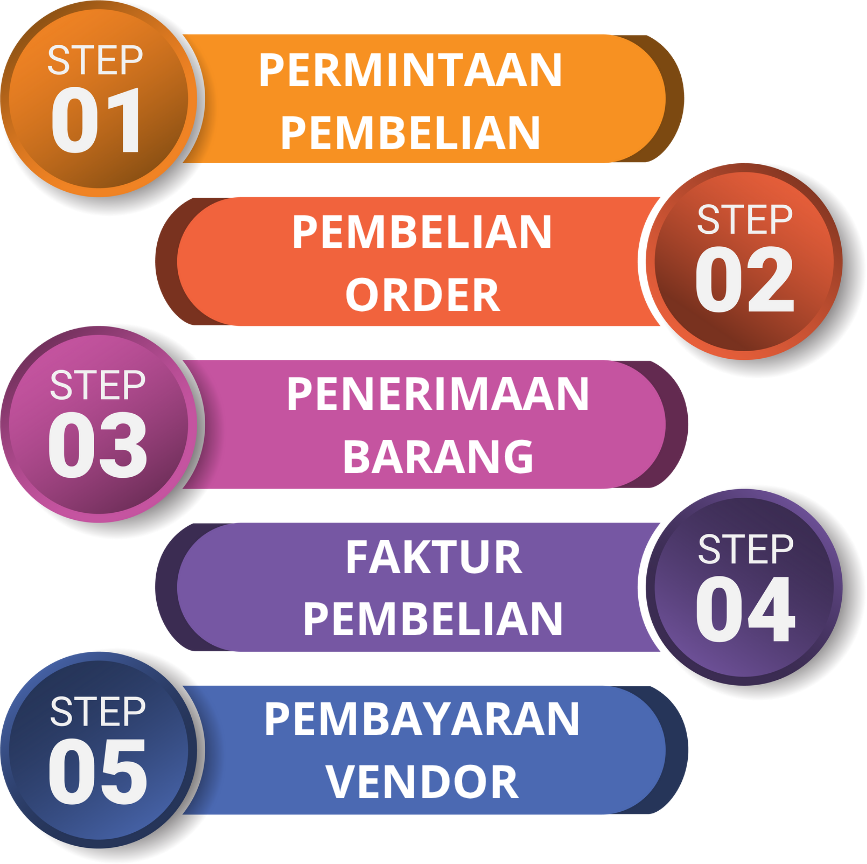
Process Steps in the ERP System
-
Create a Purchase Request (PR)
- PIC (Person in Charge): All User Departments.
- When to Perform: When a department needs goods or services, they create a PR in the system via the Purchase Request menu.menu. This document will go through approval before being forwarded to the Procurement department.
- Modul Terkait: Pembelian.

-
MembuatCreating Ordera Pembelian (Purchase Order - (PO)
- PIC: Procurement.
- KapanWhen Dilakukan:It SetelahIs Done: After the PR disetujui,is timapproved, the Procurement akanteam memilihselects a vendor danand membuatcreates the PO melaluithrough the Purchase Order menu Order Pembelian. This PO iniis adalahthe dokumenofficial resmidocument yangsent dikirimto kethe vendor sebagaias pesanan.an order.
- ModulRelated Terkait:Module: Pembelian.Purchasing.
-
PenerimaanGoods BarangReceipt diat GudangWarehouse
- PIC: Warehouse.
- KapanWhen Dilakukan:It KetikaIs Done: When the vendor mengirimkandelivers barang,goods, timthe GudangWarehouse akanteam membuatcreates dokumena PenerimaanGoods BarangReceipt melaluidocument through the Goods Receipt menu, Penerimaanreferring Barangto denganthe mengacuPO padanumber. nomorOnce PO.this Saatdocument dokumenis inisaved, disimpan,the stoksystem baranginventory distock sistem akan bertambah.increases.
- ModulRelated Terkait:Module: Persediaan.Inventory.

-
VerifikasiInvoice FakturVerification & PembayaranVendor ke VendorPayment
- PIC: Finance, Procurement.
- KapanWhen Dilakukan:It TimIs Done: The Finance/Procurement menerimateam fakturreceives dariinvoices vendorfrom danvendors mencatatnyaand direcords them in the Purchase Invoice menu Faktur Pembelian. SetelahAfter diverifikasi,verification, hutangthe dicatatliability danis pembayaranrecorded dijadwalkanand melaluipayment modulis Bukuscheduled Hutangthrough the Accounts Payable module > Vendor PaymentPayment.
- Related ModulModules: Terkait:Purchasing, Pembelian,Accounts Buku Hutang.Payable.