Skip to main content
Outstanding Debtors
Report Module Guide: Outstanding Debtors Report
Module Location
Accounts Receivable > Reports > Outstanding Debtors
Module Objective
The Outstanding Debtors Report module is used to generate a list of customers who have an outstanding receivable balance. This report provides a quick general overview to see which customers currently have payment obligations to the company.
1. Report Parameters (Filter)
The main page of this module is a form containing several parameters to customize the report that will be generated.
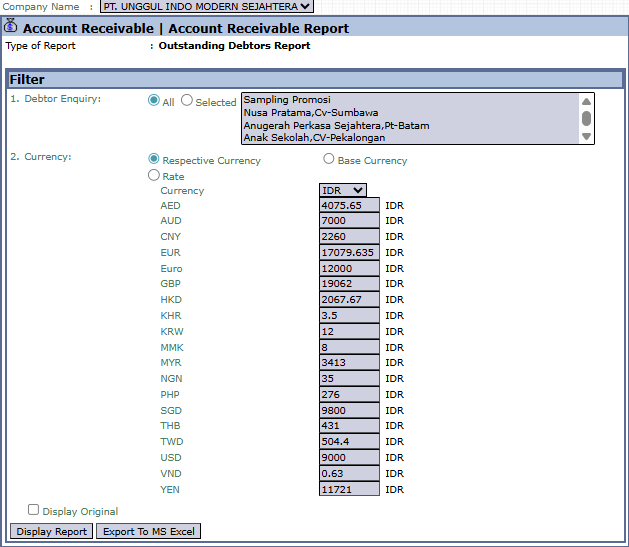
Here is an explanation for each parameter:
-
Debtor Enquiry:
-
This is the primary filter for selecting customers.
-
All: Select this to display a list of all customers who have a receivable.
-
Selected: Select this to display the receivables for one or more specific customers that you choose from the list.
-
Currency:
-
Choose how currency values will be displayed in the report.
-
Respective Currency: Displays values in the original transaction currency.
-
Base Currency: Converts all values to the company's base currency (e.g., IDR).
2. Steps to Generate the Report
Step 1: Set Report Parameters
Select the scope of customers you want to see in the Debtor Enquiry filter.

Step 2: Generate the Report
After the parameters are set, click one of the two buttons in the bottom-left section of the page:
-
Display Report: To preview the report directly on your screen. 
-
Export To MS Excel: To download the report data in an Excel file format.

Tips & Important Notes
-
Use this report to get a quick list of all customers who have a receivable balance.
-
This report is different from the Aged Receivables Report because its focus is on "who" is indebted, not "how long" the debt has been outstanding.
-
This is a useful report for the Sales and Accounts Receivable (AR) teams to monitor the general status of customer receivables.
