Skip to main content
General Journal
Detailed Module Guide: General Journal
Module Location
General Ledger > General Journal > General Journal
Module Objective
The General Journal module is a fundamental accounting tool used to record various financial transactions that are not covered by other specific modules (such as Sales Invoices or Purchase Invoices). This module is commonly used for entries such as:
-
Month-end adjusting entries (e.g., accrued expenses).
-
Corrections of recording errors.
-
Reversing entries.
-
Inter-cash/bank transactions.
1. Main View (General Journal List)
When you open the module, you will see the main page containing a list of all General Journal entries that have been created.
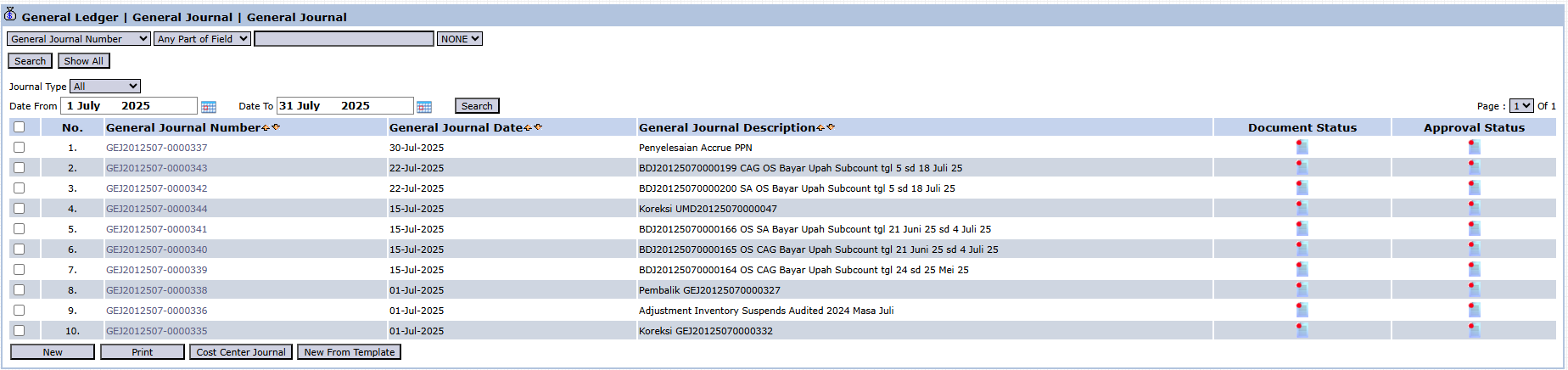
View Explanation
This page is the central hub for viewing and managing all recorded journals.
-
Filters: You can search for a specific journal by General Journal Number, Journal Type, or a Start Date and End Date range.
-
Journal List: The table below displays a summary of each journal entry.
Column Explanations
-
General Journal Number: A unique code generated by the system for each journal entry, for example, "GE2012507-0000037".
-
Journal Date: The date the journal transaction was recorded.
-
General Journal Description: A brief explanation of the journal's purpose, for example, "Accrued VAT Settlement" or "Audited Inventory Suspense Adjustment".
-
Document Status & Posting Status: Icons that indicate the journal's status, whether it is still a draft, has been confirmed (posted), or is in the approval process.
-
New: The primary button to create a new General Journal entry.
-
Print: To print the journal voucher for a selected entry.
-
Cost Center Journal: A specific feature to create journals related to a Cost Center.
-
Create New From Template: To create a new journal by copying from an existing journal template or framework, which is very useful for recurring journals.
2. Steps to Create a New General Journal
The following is a guide to recording a transaction using the General Journal.
Step 1: Click the "New" Button
From the main view, click the New  button in the bottom-left corner to open the General Journal entry form.
Step 2: Fill in the Header Information
On the General Journal Creation form, fill in the general information at the top:
-
Date: Enter the transaction date. By default, it is filled with today's date (July 29, 2025). 
-
Journal Type: Select the appropriate journal type (e.g., General). 
-
Memo: Provide a clear and complete description of the purpose of this journal.

Step 3: Fill in the Journal Details (Debit & Credit Accounts)
This is the core step of journaling. You must enter the accounts affected by the transaction.
-
Click the "+ Add Account" link to add a journal entry row. 
-
In the row that appears, fill in the following columns:
-
Account: Enter or select the account code from the Chart of Accounts.
-
Debit: Fill in the amount in this column if the account is in the Debit position.
-
Credit: Fill in the amount in this column if the account is in the Credit position.
-
Description: Provide an additional explanation for that account line if needed.
-
Cost Center / Project: Allocate the expense or revenue to a specific Cost Center or Project if relevant.
-
Repeat this step until all accounts involved in the transaction have been entered.
-
Important: Ensure that the Total Debits must always equal the Total Credits. Pay attention to the totals displayed at the bottom of the table (Total Debit / Credit).
Step 4: Saving and Confirmation
After all data is entered and balanced, use the buttons in the bottom-left section:
-
Save: To save the journal as a draft. The journal has not yet been posted to the general ledger and can still be modified. 
-
Confirm: To post the journal to the general ledger. A confirmed journal is final and will affect the financial reports. 
Tips & Important Notes
-
The General Journal module is typically used by the Accounting team, who understands fundamental accounting principles (debit-credit) and the company's Chart of Accounts structure.
-
Always ensure Total Debits equal Total Credits before pressing [Confirm] to avoid an unbalanced journal.
-
Use the Create New From Template feature for efficiency when creating routine and recurring journals each month, such as amortization or depreciation entries.
